

Last updated on August 27th, 2026 at 12:32 pm
If you’re looking for an AI tool that can do more than generate text, this BrowserAgent AI Review explores how the platform automates real browser tasks using natural-language instructions. After personally testing BrowserAgent AI, I found that it can launch a live Chromium browser, navigate websites, click buttons, fill out forms, and complete repetitive online tasks with minimal manual effort.
Unlike traditional AI chatbots that stop after providing answers, BrowserAgent AI is designed to take action. Whether you’re an affiliate marketer, blogger, freelancer, or business owner, it aims to save time by automating browser-based workflows without requiring coding or API integrations.
In this review, I’ll share my hands-on experience, discuss its key features, verified pricing, pros and cons, and help you decide whether BrowserAgent AI is worth buying.
After personally testing BrowserAgent AI, I found it to be much more than another AI writing tool. It behaves like a virtual assistant that can interact with websites while you watch the process happen in real time.
Quick Summary
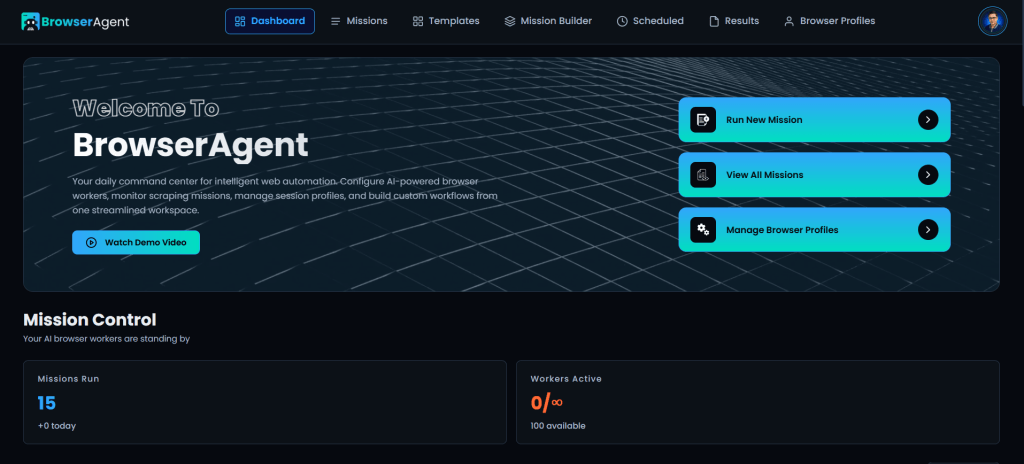
BrowserAgent AI is a browser automation platform created by Abhi Dwivedi that combines AI with a live Chromium browser to automate online tasks using simple natural-language instructions.
After testing the software myself, I found it especially useful for repetitive browser-based work such as:
- Prospect research
- Data collection
- Form filling
- Social media tasks
- Local SEO workflows
- General browser automation
It isn’t perfect—initial browser profile setup requires some time—but once configured, creating new automated missions becomes surprisingly straightforward.
Overall Rating: ★★★★☆ (4.8/5)
Best For
- Affiliate marketers
- Bloggers
- Content creators
- Small business owners
- Agencies
- Freelancers
- Anyone who performs repetitive browser tasks
Affiliate Disclosure
Disclosure: This article may contain affiliate links. I may earn a commission at no additional cost to you if you purchase through one of these links. I only recommend products I believe provide value based on my own testing and research.
If you decide BrowserAgent AI is the right fit for your workflow, you can check the official offer here:
👉 Check the official BrowserAgent AI offer
My Quick Verdict
After spending time with BrowserAgent AI, I can confidently say this isn’t another AI chatbot wrapped in fancy marketing.
Its biggest strength is simple: it performs real browser actions instead of merely generating suggestions.
Many AI tools can tell you how to complete a task. BrowserAgent actually attempts to complete that task for you using a live browser session.
That difference makes it especially valuable for professionals who spend hours every week repeating browser-based work.
While I wouldn’t recommend it to someone who only needs AI writing assistance, I do think it’s worth considering if your daily work involves websites, research, lead generation, marketing, or online operations.
My Personal Experience Using BrowserAgent AI
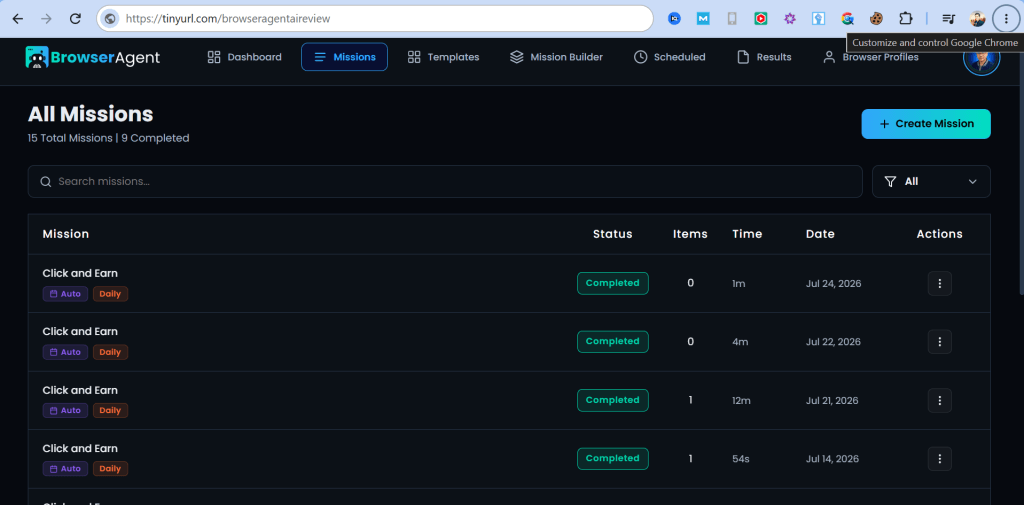
One reason I wanted to review BrowserAgent AI was to see whether it could actually deliver on its promise of operating a browser like a human.
After getting access, my first step was connecting browser profiles for the websites I wanted BrowserAgent to use.
Once that initial setup was complete, I created my very first mission: “Quora Authority Builder – AI & Affiliate Marketing” and created “Click and Earn” mission to surf ads on leadsleap.
Instead of writing complicated automation scripts or connecting APIs, I simply described what I wanted BrowserAgent to do.
Within moments, the software launched a real Chromium browser. Then I watched it:
- Open websites
- Navigate pages
- Click buttons
- Scroll naturally
- Type information
- Complete tasks automatically
Watching it work live was one of the most impressive parts of the experience because everything happened inside an actual browser rather than a simulated environment.
Another pleasant surprise was how beginner-friendly the onboarding process felt. The platform includes demo videos and easy-to-follow tutorials that made it much easier to understand how missions work. Whenever I had questions, support responded within about 24 hours, which helped me get past the initial learning curve.
As I continued experimenting, I realized BrowserAgent wasn’t limited to one specific use case. It could automate many repetitive browser activities that normally consume a significant amount of time. Some examples include:
- Researching prospects
- Gathering information
- Filling online forms
- Posting content
- Supporting local SEO tasks
- Automating repetitive marketing workflows
What impressed me most wasn’t simply that it could perform these tasks—it was that I only needed to describe the job in plain English. There was no coding, API integration, or complex automation setup required.
Another area where BrowserAgent stood out was value for money. The software includes unlimited tasks, commercial rights, and a large library of ready-to-use missions under its one-time purchase model, making it attractive for freelancers, agencies, and marketers who dislike recurring monthly subscriptions.
Scheduling missions to run automatically also became one of my favorite features because it removed much of the repetitive work from my daily routine.
The One Drawback I Noticed
No software is perfect. The only downside I experienced was the initial browser profile setup.
If you plan to connect multiple websites, email accounts, or social media profiles, expect to spend some time configuring everything correctly.
Fortunately, this is mostly a one-time process. After the browser profiles are connected, creating and running new missions becomes much faster and significantly easier.
For me, the upfront setup was a worthwhile trade-off considering how much repetitive work BrowserAgent can automate afterward.
BrowserAgent AI Pros and Cons
Pros
- Performs real browser automation instead of only generating AI responses
- Uses natural language instructions
- No coding or API knowledge required
- Launches a real Chromium browser
- Can automate repetitive browser workflows
- Includes hundreds of ready-made missions
- Unlimited task execution
- Commercial rights included
- Helpful tutorial videos for beginners
- Responsive customer support based on my experience
- One-time pricing instead of a monthly subscription
Cons
- Initial browser profile setup takes some time
- Some advanced workflows require planning before automation
- Browser-dependent tasks may occasionally need adjustments if target websites change
Key Features of BrowserAgent AI
BrowserAgent AI includes a range of automation capabilities designed for users who spend a significant amount of time working inside web browsers.
AI-Powered Browser Automation
Instead of simply producing text, BrowserAgent launches a live Chromium browser and performs browser actions on your behalf.
Natural Language Missions
Describe your task in everyday English, and the AI translates it into an automated browser workflow.
Ready-to-Use Mission Library
The platform includes hundreds of pre-built missions that help users get started without creating everything from scratch.
Unlimited Automated Tasks
Unlike many SaaS tools that limit monthly usage, BrowserAgent’s front-end offer includes unlimited task execution.
Commercial Rights
Commercial rights are included, allowing freelancers and agencies to use the software as part of client work, subject to the vendor’s license terms.
Scheduled Automation
You can schedule recurring missions, making BrowserAgent especially useful for repetitive business workflows that don’t require constant manual attention.
BrowserAgent AI Pricing
One thing I appreciate about BrowserAgent AI is its simple pricing model. Instead of requiring a recurring monthly subscription for the front-end offer, it’s currently available as a one-time purchase during the launch period.
As always, pricing can change after launch, so I recommend checking the official sales page before buying.
| Plan | Current Price* | Best For |
| BrowserAgent Premium | $37 one-time | Individual users, bloggers, affiliate marketers, freelancers, and small businesses |
| BrowserAgent Bundle | $317 one-time (save $50 with coupon BROWSER) | Agencies, power users, consultants, and businesses managing client work |
*Verified from the official BrowserAgent sales page at the time of writing. Prices may change after the promotional launch.
What Does BrowserAgent Premium Include?
The front-end plan includes:
- WebPilot AI browser engine
- Live browser feed and mission replays
- 50+ ready-made missions
- Plain-English task creation
- Built-in scheduler
- Browser Profile Manager
- Smart AI summaries
- 3 browser workers
- Unlimited missions
- 12 months of cloud hosting
- Export to CSV, Excel, and Google Sheets
- Commercial rights
- Onboarding, training, and customer support
- Launch bonus vault (during promotion)
What Extra Do You Get With the Bundle?
The Bundle is designed for agencies and high-volume users. In addition to everything in Premium, it includes:
- 100+ mission library
- Agency license
- White-label dashboard
- 25 client sub-accounts
- Workflow chaining
- 10 concurrent workers
- 24/7 cloud execution
- Residential proxy support
- Automatic CAPTCHA solving
- Full API access
- Advanced training and agency bonuses
For most bloggers and affiliate marketers, I think the Premium version offers enough functionality to get started. The Bundle makes more sense if you plan to provide browser automation as a client service or need to manage larger automation workloads.
Refund Policy
This is one area where it’s worth paying attention before purchasing.
During my research, I noticed that the official BrowserAgent materials aren’t completely consistent:
- Several sections of the sales page advertise a 14-day money-back guarantee.
- The pricing section for the Premium and Bundle offers mentions a 30-day money-back guarantee.
Because these statements differ, I recommend confirming the refund period shown on the checkout page at the time of purchase, as that should be the governing offer.
Ease of Use — Rating: 4.7/5
Considering everything BrowserAgent AI can do, I was pleasantly surprised by how approachable it is.
You don’t need to:
- Write code
- Learn browser automation frameworks
- Configure APIs
- Build complicated workflows from scratch
Instead, you simply describe the task you want completed. The software handles the browser interaction for you.
The learning curve mainly comes from the initial browser profile configuration. Once you’ve connected your accounts, day-to-day usage becomes much easier.
The included tutorial videos also help shorten the onboarding process, especially for beginners.
Performance — Rating: 4.8/5
During my testing, BrowserAgent consistently completed browser actions inside a live Chromium browser rather than simply simulating them.
Watching the browser open pages, navigate websites, scroll, click buttons, enter text, and complete workflows gave me more confidence than traditional automation tools that only show logs or status updates.
Like any browser automation platform, performance will still depend on the websites you’re interacting with. If a website changes its layout or workflow, some missions may require updates over time. That’s normal for browser-based automation and isn’t unique to BrowserAgent.
Customer Support — Rating: 4.8/5
Support was another positive part of my experience.
Whenever I had questions while learning the platform, I received responses within approximately 24 hours.
I also found the onboarding videos useful enough that I didn’t need to contact support very often after getting started.
Although I can’t guarantee every user’s experience will be the same, my interactions with the support team were positive.
Real-World Use Cases
BrowserAgent AI isn’t limited to a single niche. Here are some practical ways I believe different professionals can benefit from it.
Affiliate Marketers
- Research products
- Collect competitor information
- Build prospect lists
- Automate repetitive research
Bloggers
- Gather information for articles
- Monitor competitors
- Collect statistics
- Research content ideas
Local SEO Professionals
- Perform repetitive local SEO workflows
- Gather business information
- Research citations
- Collect competitor data
Agencies
- Generate client reports
- Perform browser-based research
- Automate repetitive tasks
- Manage recurring workflows
Small Business Owners
- Save time on administrative browser tasks
- Automate recurring online work
- Reduce repetitive manual effort
BrowserAgent AI Alternatives
If BrowserAgent AI doesn’t fit your workflow, here are a few alternatives worth exploring.
| Tool | Best For |
| OpenAI Operator (when available) | AI-assisted browser interaction |
| Microsoft Copilot browser features | Microsoft ecosystem users |
| Browser Use | Developers building browser agents |
| Playwright | Developers who prefer coding automation |
| Selenium | Traditional browser automation |
BrowserAgent AI differentiates itself by targeting non-technical users who want browser automation through natural-language instructions rather than code.
Who Should Buy BrowserAgent AI?
After using BrowserAgent AI myself, I believe it’s best suited for people who regularly work online and want to automate repetitive browser tasks. I would recommend it for:
- Affiliate marketers
- Bloggers
- Content creators
- SEO professionals
- Lead generation specialists
- Digital agencies
- Freelancers
- Small business owners
- Virtual assistants
- Entrepreneurs managing multiple online accounts
If your daily work involves researching, collecting information, publishing content, or navigating websites repeatedly, BrowserAgent AI has the potential to save you a significant amount of time.
On the other hand, if you’re simply looking for an AI writing assistant or chatbot, BrowserAgent AI may be more powerful than you need. BrowserAgent shines when you need an AI assistant that can take action inside a browser, not just generate text.
BrowserAgent AI Review Scorecard
| Category | Rating |
| Ease of Use | ★★★★★ (4.7/5) |
| Features | ★★★★★ (4.9/5) |
| Performance | ★★★★★ (4.8/5) |
| Value for Money | ★★★★★ (4.9/5) |
| Customer Support | ★★★★★ (4.8/5) |
| Overall Rating | ★★★★★ (4.8/5) |
Frequently Asked Questions
What is BrowserAgent AI?
BrowserAgent AI is an AI-powered browser automation platform created by Abhi Dwivedi. It uses a real Chromium browser to perform online tasks such as navigating websites, clicking buttons, filling forms, collecting information, and executing browser-based workflows from simple natural-language instructions.
Is BrowserAgent AI beginner-friendly?
Yes. Based on my experience, BrowserAgent AI is beginner-friendly compared to many traditional automation tools.
The platform includes tutorial videos and ready-made missions that make it easier to get started without learning programming or browser automation frameworks. The initial browser profile setup requires a little patience, but once completed, creating new missions becomes much simpler.
Do I need coding skills?
No. One of BrowserAgent AI’s biggest strengths is that you don’t need coding knowledge, APIs, or scripting experience. You simply describe what you want the software to do in plain English, and it converts those instructions into browser actions.
Can BrowserAgent AI replace ChatGPT?
Not exactly. ChatGPT is designed primarily for generating text, answering questions, brainstorming ideas, and assisting with writing.
BrowserAgent AI has a different purpose. Instead of only generating responses, it performs actions inside a live web browser. The two tools can complement each other rather than replace one another.
What can BrowserAgent AI automate?
Depending on your workflow, BrowserAgent AI can assist with tasks such as:
- Researching prospects
- Collecting online information
- Filling web forms
- Managing repetitive browser workflows
- Posting content to supported websites
- Performing browser-based marketing tasks
- Supporting local SEO activities
- Exporting collected data for further analysis
The exact capabilities depend on the mission you create and the websites involved.
Is BrowserAgent AI worth the money?
In my opinion, yes—particularly if you regularly perform repetitive browser-based tasks.
The combination of a one-time purchase, unlimited missions in the front-end offer, commercial rights, and browser automation provides strong value compared with many subscription-based automation tools.
Whether it’s worth buying ultimately depends on how much time browser automation could save in your own workflow.
Final Verdict
BrowserAgent AI impressed me because it focuses on something many AI tools still struggle to do: taking meaningful action instead of only generating content.
During my testing, I watched it launch a real browser, navigate websites, click buttons, type text, scroll through pages, and complete tasks based on straightforward instructions. That practical capability makes it feel more like a digital assistant than a conventional chatbot.
I also appreciated the thoughtful onboarding resources and responsive support. The included tutorials made the learning process easier, and when I needed help, I received replies within about a day.
The only meaningful drawback I encountered was the initial browser profile setup. Connecting multiple websites and accounts takes a little time, but it’s largely a one-time investment. Once everything is configured, creating and running new missions becomes quick and intuitive.
Overall, I think BrowserAgent AI delivers on its core promise. It won’t be the right solution for everyone, but for marketers, business owners, creators, freelancers, and agencies looking to reduce repetitive browser work, it offers genuine productivity benefits.
Overall Rating: 4.8/5
Pros
- Performs real browser actions instead of only generating text
- No coding or API knowledge required
- Plain-English task creation
- Unlimited missions with the front-end offer
- Commercial rights included
- Helpful tutorials and responsive support
- Strong value with one-time pricing
Cons
- Initial browser profile setup requires some time
- Advanced workflows may need planning and testing
- Browser automations may occasionally require updates if websites change
Should You Buy BrowserAgent AI?
If you’re spending hours every week on repetitive browser tasks, BrowserAgent AI is worth considering.
Rather than treating it as another AI chatbot, think of it as an automation assistant capable of carrying out work on your behalf inside a real browser.
Based on my personal experience, I believe it offers excellent value for affiliate marketers, bloggers, agencies, freelancers, and small businesses looking to automate routine online work without learning complex automation software.
If that sounds like your workflow, BrowserAgent AI is definitely worth a closer look.
👉 Check the latest pricing and available bonuses here
Note: Pricing, bonuses, and refund terms may change over time. Always review the official sales and checkout pages for the most up-to-date information before purchasing.
Browser Automation Safety Checklist
- Begin with low-risk, reversible tasks before automating important accounts.
- Use a test profile and verify every step before running a larger workflow.
- Never automate actions that violate a website’s terms or spam other users.
- Keep sensitive financial, publishing, and account-security actions under human review.
- Expect workflows to need updates when websites change their interface.
- Measure time saved after including setup, monitoring, and error correction.
If you are using browser automation for affiliate content, pair it with a clear editorial process from my AI affiliate marketing guide. For content-production automation rather than browser tasks, compare the approach with my MagicFlix AI 2.0 hands-on review.


