
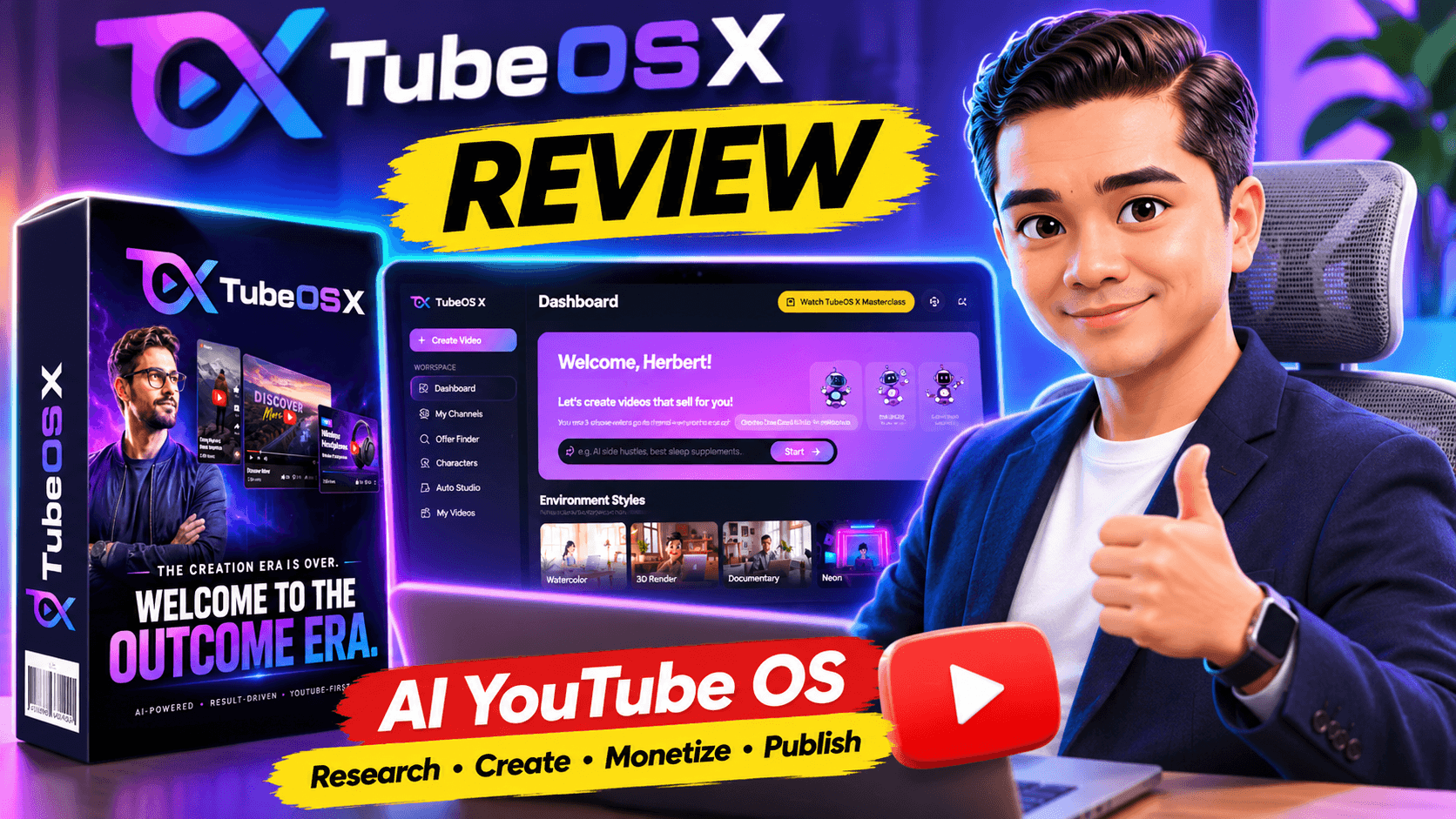
Can TubeOS X really make YouTube video creation easier while helping affiliate marketers build content with a purpose? Here’s what I discovered after getting review access.
Affiliate Disclosure: This article contains affiliate links. If you purchase through my link, I may earn a commission at no additional cost to you. I received review access to explore TubeOS X, and the opinions shared here reflect my experience and assessment of its features.
What Is TubeOS X?
If you’ve been exploring AI video creation tools lately, you’ve probably noticed that almost every new platform promises to create videos faster and with less effort.
But here’s the thing: creating videos quickly doesn’t automatically mean you’re going to get views, subscribers, or sales.
That’s where TubeOS X takes a slightly different approach.
Created by Gaurab Borah and Ram Rawat, TubeOS X is an AI-powered YouTube content creation and management platform designed to bring several important tasks together in one place.
Instead of focusing only on generating videos, it combines niche research, AI characters, video production, affiliate offer discovery, YouTube SEO, publishing, and performance tracking.
One of its more interesting features is the ability to control your video workflow through Telegram, which means you don’t always have to sit in front of your computer.
The front-end version is advertised at $27–$37, with optional upgrades for users who need additional capabilities.
My Personal Experience With TubeOS X
I was fortunate enough to receive review access to TubeOS X, so I had the opportunity to explore the platform rather than simply relying on the sales page.
And I have to say, I enjoyed the creative side of it.
One of the first things I liked was being able to choose a niche and start developing my own video ideas.
Instead of staring at a blank screen wondering what kind of YouTube content to make, I could begin with a topic and explore how to turn it into a video.
But the feature that really caught my attention was the AI Character Builder.
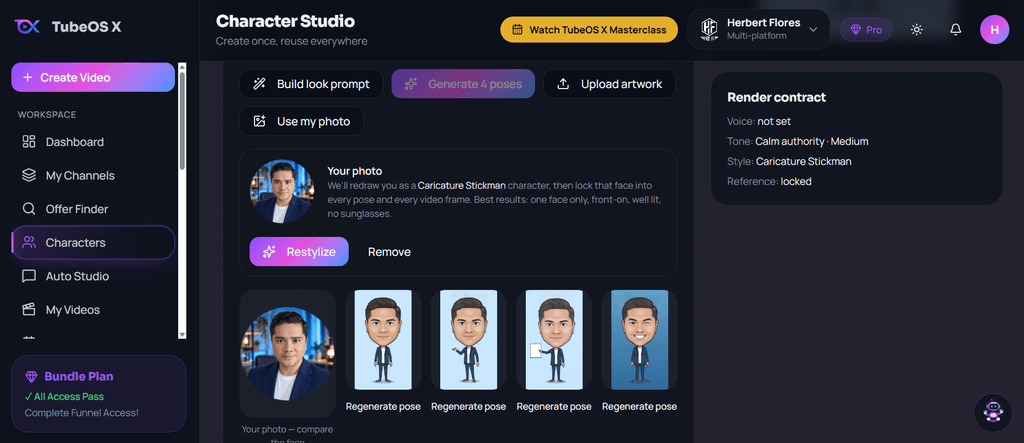
I enjoyed creating my own character and experimenting with the idea of giving my videos a recognizable identity.
For someone interested in building a faceless YouTube channel, that’s an appealing feature. You don’t necessarily need to appear on camera to develop a consistent style for your content.
I also liked that TubeOS X provides different ways to approach video creation. You can use automation for a simpler workflow or explore more detailed creative controls when you want to customize the results.
Of course, I wouldn’t say that using AI automatically produces a successful YouTube channel. You still need good topics, interesting content, and a reason for people to watch.
My experience so far has mainly focused on exploring the creation process, particularly niche selection, character building, and video ideas. I haven’t established any specific traffic or income results from TubeOS X.
Watch the TubeOS X Recorded Webinar
Want to take a closer look at TubeOS X before deciding whether it’s right for you?
I’ve included a recorded webinar below so you can learn more about the platform alongside my personal review.
While I enjoyed exploring TubeOS X myself, especially choosing a niche, creating my own AI character, and developing video ideas, I know some people prefer watching a presentation before considering new software.
🎥 Watch the TubeOS X Recorded Webinar Below
TubeOS X Bundle Deal
Explore the Complete Funnel Package
Interested in more than the standard TubeOS X package? Explore the available bundle deal and see whether it fits your content creation and marketing needs.
Optional bundle offer. Pricing, features, and availability are subject to change. Affiliate disclosure: I may earn a commission if you purchase through my link.
The webinar is an additional resource to explore while evaluating TubeOS X. I recommend comparing the information presented with the current features, credit limits, and upgrade options.
After watching, you can continue reading my review for my personal experience, the pros and cons, pricing, OTO upgrades, and available bonuses.
TubeOS X Key Features Explained
1. AI Niche Research and Video Ideas
Finding a topic people are interested in can be one of the most challenging parts of YouTube content creation.
TubeOS X includes research tools designed to help users discover potential topics, keywords, and content opportunities.
I particularly enjoyed starting with niche selection because it gave the creative process some direction.
2. AI Character Builder
This is one of my favorite features.
The AI Character Builder lets you develop recurring characters with customizable appearances, personalities, outfits, and voices.
Instead of using a different random character in every video, you can work toward a more consistent identity.
That could be useful for educational channels, storytelling videos, product reviews, or other faceless YouTube content.
3. Auto Mode and Advanced Mode
TubeOS X offers two approaches to creating videos.
Auto Mode is designed for users who want a simpler process. You provide an instruction, and the system handles much of the video creation workflow.
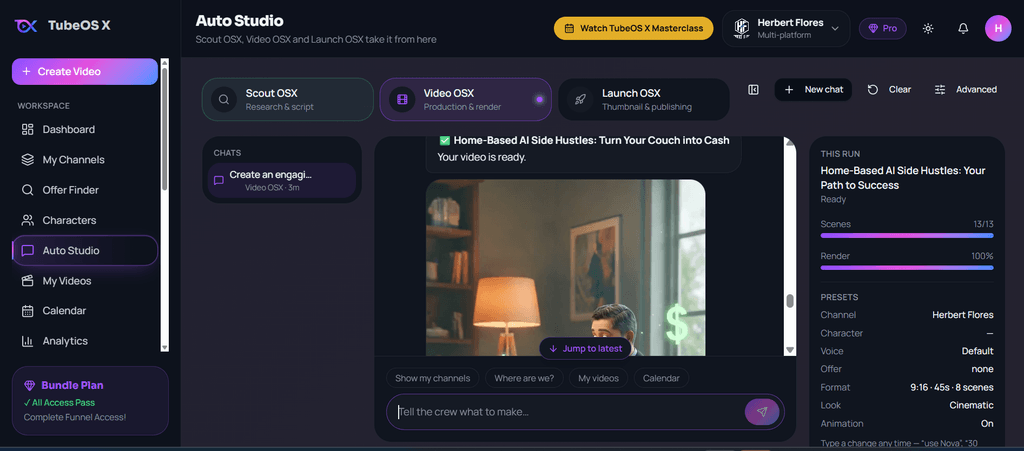
Advanced Mode provides more detailed control over elements such as scripts, storyboards, scenes, visual styles, voiceovers, captions, music, thumbnails, and publishing.
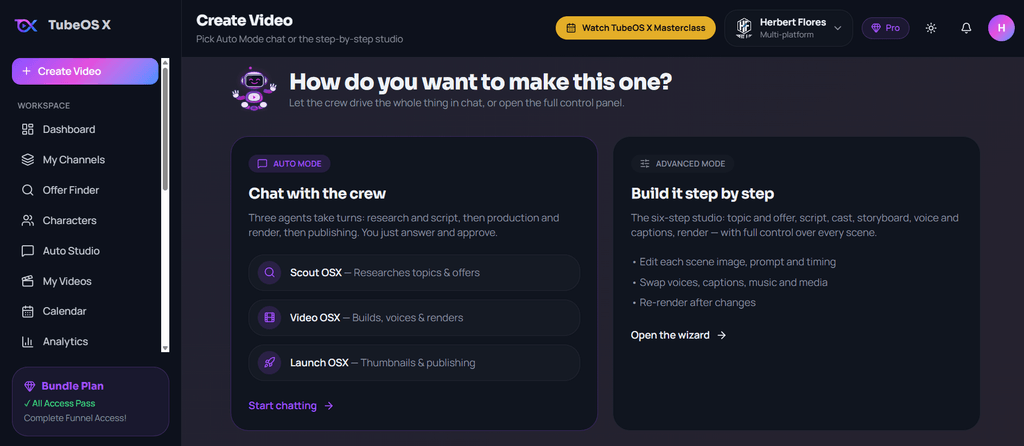
I like having both options because not every video needs the same level of customization.
4. Short-Form and Long-Form Videos
TubeOS X supports both YouTube Shorts and longer horizontal videos.
This gives creators flexibility when experimenting with different content formats.
For example, you could create shorter educational clips or develop longer videos around a product review or storytelling topic.
5. Affiliate Offer Finder
This feature makes TubeOS X especially interesting from an affiliate marketing perspective.
The Offer Finder is designed to help discover relevant products from marketplaces such as WarriorPlus, JVZoo, and other affiliate platforms.
The idea is to connect your video topic with a relevant offer instead of creating content first and figuring out monetization later.
However, it’s still important to evaluate the quality and relevance of any product before promoting it.
6. YouTube SEO Tools
TubeOS X includes tools for generating video titles, descriptions, keywords, tags, and hashtags.
These features may save time when preparing videos for publication.
That said, SEO suggestions don’t guarantee YouTube rankings. Audience interest, competition, viewer retention, and content quality still matter.
7. Telegram Video Management
Another distinctive feature is Telegram integration.
According to the product description, users can create, review, approve, manage, and publish video projects through Telegram.
I can see the appeal of this for creators who prefer managing some tasks from their phones.
8. Video Library and Publishing
TubeOS X also includes a video library for managing projects, along with direct publishing and scheduling features.
The front-end version advertises scheduling up to 30 days ahead, which could help creators plan content more consistently.
What I Like About TubeOS X
After exploring the platform, these are the things that stood out to me:
- Creative flexibility: I enjoyed selecting niches, creating my own AI character, and developing video ideas.
- Consistent branding: Recurring AI characters and channel identity settings can help make content more recognizable.
- Multiple tools in one place: Research, scripting, video creation, SEO, and publishing are designed to work together.
- Affiliate marketing features: The Offer Finder adds a useful monetization-focused element.
- Beginner-friendly options: Auto Mode offers a simpler starting point, while Advanced Mode provides more creative control.
What I Don’t Like About TubeOS X
No software is perfect, and there’s one thing I particularly want to mention.
TubeOS X uses a credit-based system.
This is probably my biggest concern.
If you create videos frequently, experiment with different ideas, or regenerate scenes several times, you’ll want to pay close attention to how credits are consumed.
I enjoy experimenting with characters and video concepts, so this is something that matters to me.
Another consideration is the optional upgrades. Some advanced features are reserved for higher-tier packages, which means the front-end purchase may not include everything shown across the entire product range.
I recommend checking the current credit allowance and feature limits before purchasing.
TubeOS X Pricing and OTO Upgrades
TubeOS X has a front-end offer along with five optional one-time offers, commonly called OTOs.
Here’s a breakdown of the upgrade funnel advertised on the official JV page.
| Version | Advertised price | Main benefits |
|---|---|---|
| TubeOS X Front End | $27–$37 | Core video creation, branding, research, offers, SEO and publishing |
| OTO 1 – Pro | $67 | Up to 10 channels, expanded generation features, 1080p videos, additional voices and analytics |
| OTO 2 – MasterMode | $97 | Team members, client workspaces, commercial rights, additional styles and 90-day scheduling |
| OTO 3 – ViralCred AI | $47 | AI-assisted Facebook content creation, scheduling and automation |
| OTO 4 – ClickAgent AI | $47 | AI-powered interactive selling rooms for offers and services |
| OTO 5 – Reseller | $297–$397 | Reseller capabilities, client account management and sales assets |
Optional downsell offers are also advertised:
- Pro: $57, without commercial rights
- MasterMode: $77, without exclusive bonuses
- ViralCred AI: $37, without commercial rights
- ClickAgent AI: $37, without commercial rights
- Reseller: $247–$347, without exclusive bonuses
These are the advertised funnel prices, not a guarantee that every offer will remain available at the same price.
Do you need every upgrade?
Personally, I would start by understanding what the front-end version can do and how its credits work.
If you’re managing multiple YouTube channels, the Pro upgrade may be worth examining.
If you plan to create videos for clients or work with a team, MasterMode may be more relevant.
The other upgrades serve different marketing or business needs, so they aren’t necessarily essential for everyone.
You can also view the official TubeOS X JV page and complete upgrade details.
TubeOS X Fast-Action Bonuses – 10 Bonuses Listed
Along with the main software, TubeOS X advertises a collection of 10 fast-action bonuses.
Here’s what’s included in the bonus list provided for this review.
Bonus #1 – Commercial License
A commercial license is listed as included in the fast-action bonuses.
This may be useful for creators interested in producing content for commercial purposes. However, check the exact license terms, because the upgrade funnel also advertises additional commercial rights.
Bonus #2 – $10k/m Giving Away Free Passes
This bonus is presented as a training or resource related to a free-pass marketing strategy.
The title references a $10,000-per-month income figure, but that should not be interpreted as a typical or guaranteed result.
Bonus #3 – My Personal Ranking Case Study & Strategy for Product Reviews
This bonus focuses on product review ranking strategies.
It could be particularly relevant to affiliate marketers who publish product reviews on blogs, websites, or video platforms.
Bonus #4 – 1000+ AI Prompts for Social Media Posts
A collection of more than 1,000 AI prompts intended to help generate ideas for social media content.
This could be a useful resource when planning promotional posts, educational content, or engagement-focused updates.
Bonus #5 – Power Marketers Club
A marketing membership resource for people interested in exploring additional marketing tools and strategies.
Bonus #6 – Free Instagram Traffic
A resource focused on generating traffic through Instagram without relying exclusively on paid advertising.
Bonus #7 – 100X YouTube Advertising
A YouTube advertising-related bonus that may provide additional ideas for promoting content or offers.
Bonus #8 – Personalized Marketing
A marketing resource centered on tailoring promotional messages to particular audiences.
Bonus #9 – LinkedIn Traffic Generation
A bonus covering ways to use LinkedIn as an additional source of traffic and potential business connections.
Bonus #10 – The Unshakeable Super Affiliate
An affiliate marketing resource intended to help marketers develop their skills and approach to promoting offers.
Bonus availability note: These bonuses are listed as fast-action offers. Their exact contents, eligibility, delivery instructions, and continued availability should be confirmed on the current offer or checkout page. The titles alone do not establish their results or value.
Who Is TubeOS X Best For?
I think TubeOS X is worth looking at if you’re interested in creating YouTube content but don’t want to manage every part of the workflow manually.
It may be especially relevant to:
- Faceless YouTube creators who want to experiment with branded AI characters.
- Affiliate marketers who want to connect video topics with relevant products.
- Bloggers and content creators who want to expand into video content.
- Beginners looking for a guided AI video creation workflow.
- Experienced marketers who want more control over scripts, branding, and publishing.
However, if you’re expecting a completely hands-off system that automatically delivers traffic and commissions, I would adjust those expectations.
TubeOS X can assist with content production, but building an audience still requires thoughtful planning, consistency, and ongoing improvement.
Is TubeOS X Worth It?
For me, the most enjoyable part of TubeOS X has been the ability to turn a niche idea into a more personalized video concept.
Creating my own AI character was especially interesting because it gave me more creative freedom than simply generating generic videos.
I also appreciate the idea of combining content creation and affiliate offer research in one platform.
But I wouldn’t ignore the credit-based system.
Before investing in any upgrade, I would look carefully at the number of videos I intend to produce and whether the available credits and features suit my needs.
My Final Verdict on TubeOS X
Overall, my experience with TubeOS X has been positive so far.
I enjoyed exploring niche selection, creating my own AI character, and developing ideas for YouTube videos.
What makes TubeOS X interesting is that it tries to connect the different stages of YouTube content creation, from researching a topic to preparing and publishing a video with a monetization strategy.
That doesn’t mean every video will rank, generate traffic, or make money. Those results still depend on your audience, content quality, offer selection, and marketing efforts.
The credit-based system is my main reservation, and I recommend reviewing the limits and optional upgrades before deciding which package makes sense.
My conclusion: TubeOS X is worth considering if you want an AI-assisted YouTube creation platform with branding and affiliate marketing features, especially if you enjoy experimenting with characters and different content ideas.
👉 Explore TubeOS X Features, Pricing & Current Offer
Disclosure: I may receive an affiliate commission if you purchase through my link. I received review access to TubeOS X. Individual results will vary, and no traffic, ranking, or income outcome is guaranteed.
Frequently Asked Questions About TubeOS X
Is TubeOS X beginner-friendly?
It includes an Auto Mode intended to simplify video creation, although beginners may still need time to learn the workflow and understand credit usage.
Can TubeOS X create YouTube Shorts?
Yes. The product advertises support for both short-form and long-form YouTube videos.
Can I use TubeOS X for affiliate marketing?
Yes. Its Offer Finder and Smart Offer Attachment features are designed to help users connect video content with relevant affiliate products.
Does TubeOS X require upgrades?
The front-end version includes the core platform. Upgrades are optional, although some capabilities and expanded limits are reserved for higher tiers.
Can TubeOS X guarantee YouTube traffic or affiliate commissions?
No. AI tools can assist with production and optimization, but they cannot guarantee rankings, viewers, sales, or commissions.
Can I manage TubeOS X through Telegram?
The platform advertises Telegram-based video creation and management, including review, approval, and publishing workflows.


