
Last updated on August 27th, 2026 at 10:58 am
Want to Promote Affiliate Products But Don’t Want to Appear on Camera?
One of the biggest challenges affiliate marketers face today is creating engaging content consistently.
Many beginners want to promote products online, but they often run into several common problems:
- They don’t want to show their face.
- They don’t have video editing skills.
- They struggle to create professional-looking videos.
- They spend too much money on credit-based AI tools.
- They feel overwhelmed by complicated software and technical workflows.
The good news?
Thanks to artificial intelligence, creating realistic UGC (User-Generated Content) videos has become easier than ever.
In this guide, you’ll learn a simple AI-powered workflow that allows you to create professional UGC-style affiliate videos for both digital and physical products—even if you’re a complete beginner.
What Are AI UGC Videos?
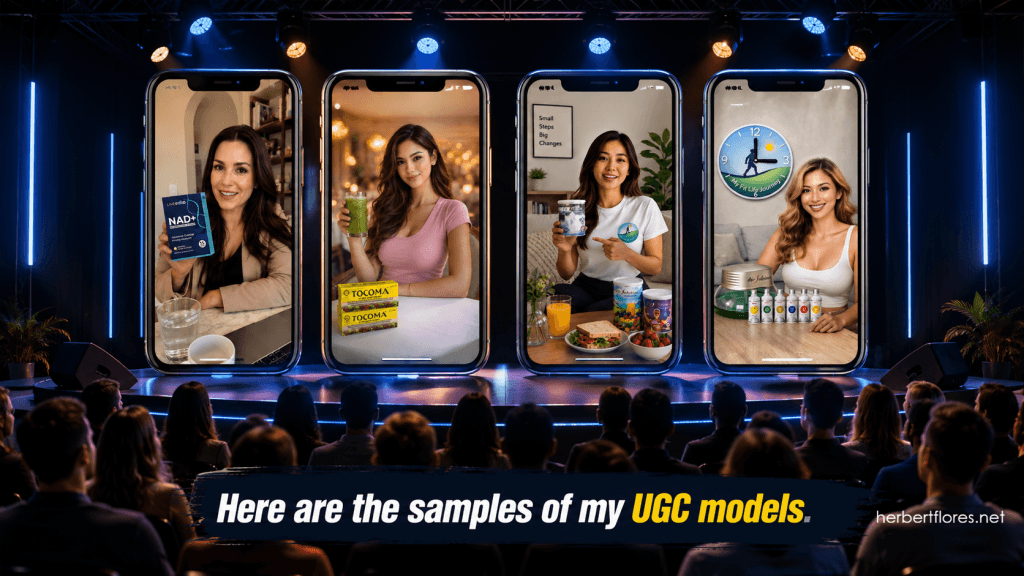
UGC stands for User-Generated Content.
These are videos that look like authentic recommendations from real people.
Brands and affiliate marketers love UGC because it feels more natural, trustworthy, and relatable than traditional advertisements.
Today, AI tools allow you to create realistic UGC-style videos without hiring actors, recording yourself, or spending hours editing.
AI UGC videos are perfect for:
✅ Affiliate Marketing
✅ Product Reviews
✅ Lead Generation
✅ Social Media Content
✅ Faceless Marketing
✅ Short-Form Videos
Step One: Choose a Product
The first step is selecting a product you want to promote.
You can choose either a physical product or a digital product.
Physical Products

- Health supplements
- Coffee products
- Beauty products
- Gadgets
- Kitchen tools
- Home products
Digital Products
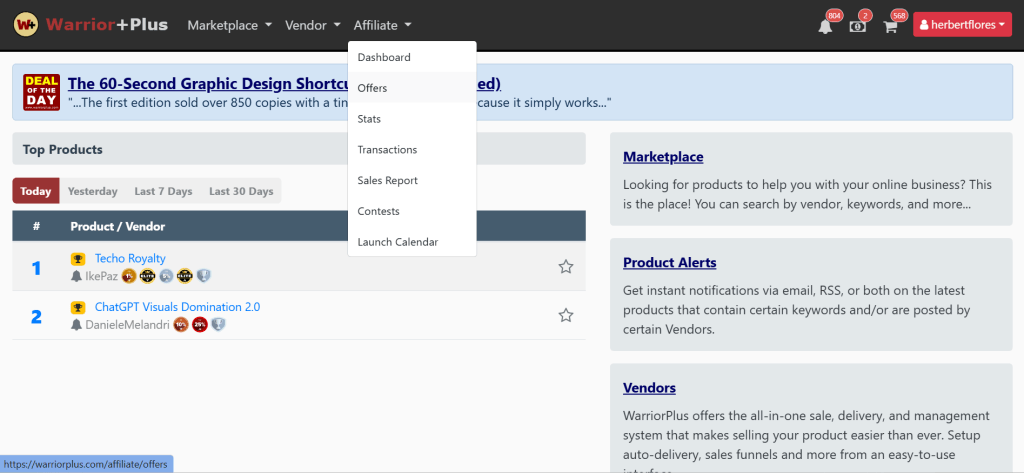
- AI software
- Online courses
- Membership programs
- SaaS tools
- Affiliate offers
- Digital downloads
💡 Pro Tip: Products that solve a specific problem tend to convert better.
Step Two: Gather Product Assets
Collect the images and screenshots you’ll use in your content.
For physical products:
- Product photos
- Packaging photos
- Lifestyle photos
For digital products:
- Dashboard screenshots
- Sales page screenshots
- Results screenshots
- Feature screenshots
The better your assets, the more realistic your AI-generated content will look.
Step Three: Create Your AI UGC Model
Now decide who will appear in your video.
You have several options.
Option One: Use Your Own Photo
This is ideal if you’re building a personal brand.
People naturally trust real people.
Option Two: Create a Consistent AI Avatar
Generate a unique AI character and use it repeatedly.
This helps create brand recognition.
Option Three: Generate New Models
You can create different AI models for different niches and campaigns.
⚠️ Important: Never use celebrity photos or other people’s photos without permission.
Always use your own image or generate original AI characters.
Step Four: Create Your UGC Image Using AI
Now it’s time to generate your UGC image.
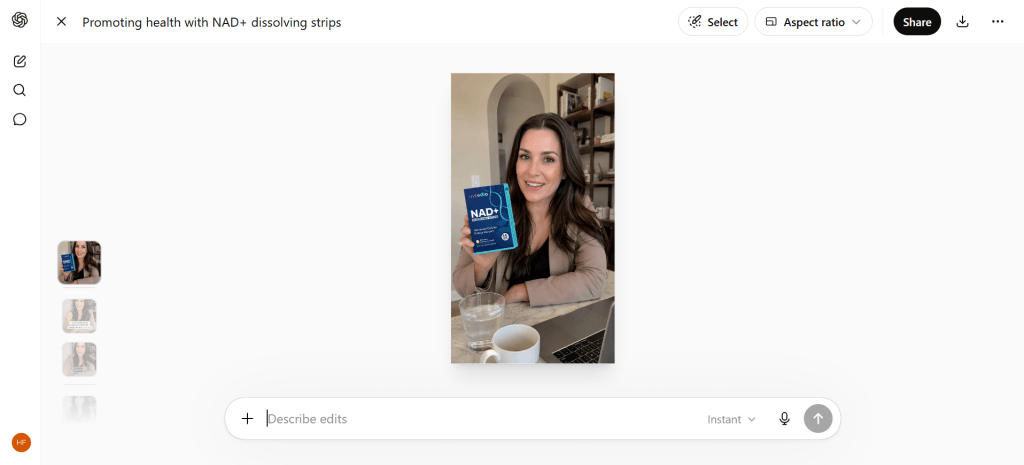
Recommended tools:
For physical products, create images showing a realistic person holding the product.
For digital products, create images showing a person holding a smartphone or laptop displaying screenshots of the software, dashboard, or sales page.
Prompt for Physical Products
Copy and customize this prompt:
Create an ultra-realistic UGC style image.

A friendly woman in her early 30s holding a [PRODUCT NAME].

Natural smile.

Looking directly at the camera.

Modern home setting.

Professional lighting.

Shallow depth of field.

Authentic social media UGC advertisement style.

Highly realistic skin texture.

Natural hand positioning.

No text overlay.

9:16 aspect ratio.

DSLR photography.

Ultra realistic.
Prompt for Digital Products (Phone Version)
Attach your product screenshot.
Create an ultra-realistic UGC style image.

A professional-looking woman sitting in a modern workspace.

She is holding a smartphone displaying the attached screenshot.

Natural smile.

Looking directly at camera.

Professional lighting.

Clean office background.

Realistic skin texture.

Authentic user-generated content style.

No text overlay.

9:16 aspect ratio.

High quality DSLR photography.

Social media advertisement quality.
Prompt for Digital Products (Laptop Version)
Attach your dashboard or sales page screenshot.
Create an ultra-realistic UGC style image.

A confident man sitting at a desk.

A laptop in front of him clearly displays the attached screenshot.

Natural expression.

Modern office environment.

Professional lighting.

Clean background.

Authentic UGC advertisement style.

Realistic photography.

No text overlay.

16:9 aspect ratio.

High quality DSLR image.
Prompt Using Your Own Photo
Perfect for personal branding.
Use the attached photo as the exact face reference.

Do not change facial features.

Maintain facial structure, skin tone, hairstyle, and identity.

Create an ultra-realistic UGC style image.

The person is holding a smartphone displaying the attached screenshot of [PRODUCT NAME].

Natural smile.

Professional lighting.

Clean modern office background.

No text overlay.

9:16 aspect ratio.

DSLR photography.

Social media ad quality.

Strict face consistency.
Step Five: Generate a Video Script
Now create a simple UGC-style script.
You can use ChatGPT or your preferred AI writing tool.
A simple structure:
Hook
Grab attention immediately.
Problem
Identify the audience’s challenge.
Solution
Introduce the product naturally.
Benefits
Explain why it helps.
Call To Action
Tell viewers what to do next.
Script Prompt
Create a 60-second UGC style video script.

Target audience:
[Describe audience]

Product:
[Product name]

Problem:
[Problem solved]

Tone:
Friendly and conversational.

Include:
Hook
Problem
Solution
Benefits
Call To Action

Keep sentences short and natural for AI voiceovers.
Step Six: Turn Your Image Into a Video
This is where everything comes together.
Instead of spending hours editing videos manually, you can transform your AI image into a talking video.
Recommended Tools
TalkingPhotos AI
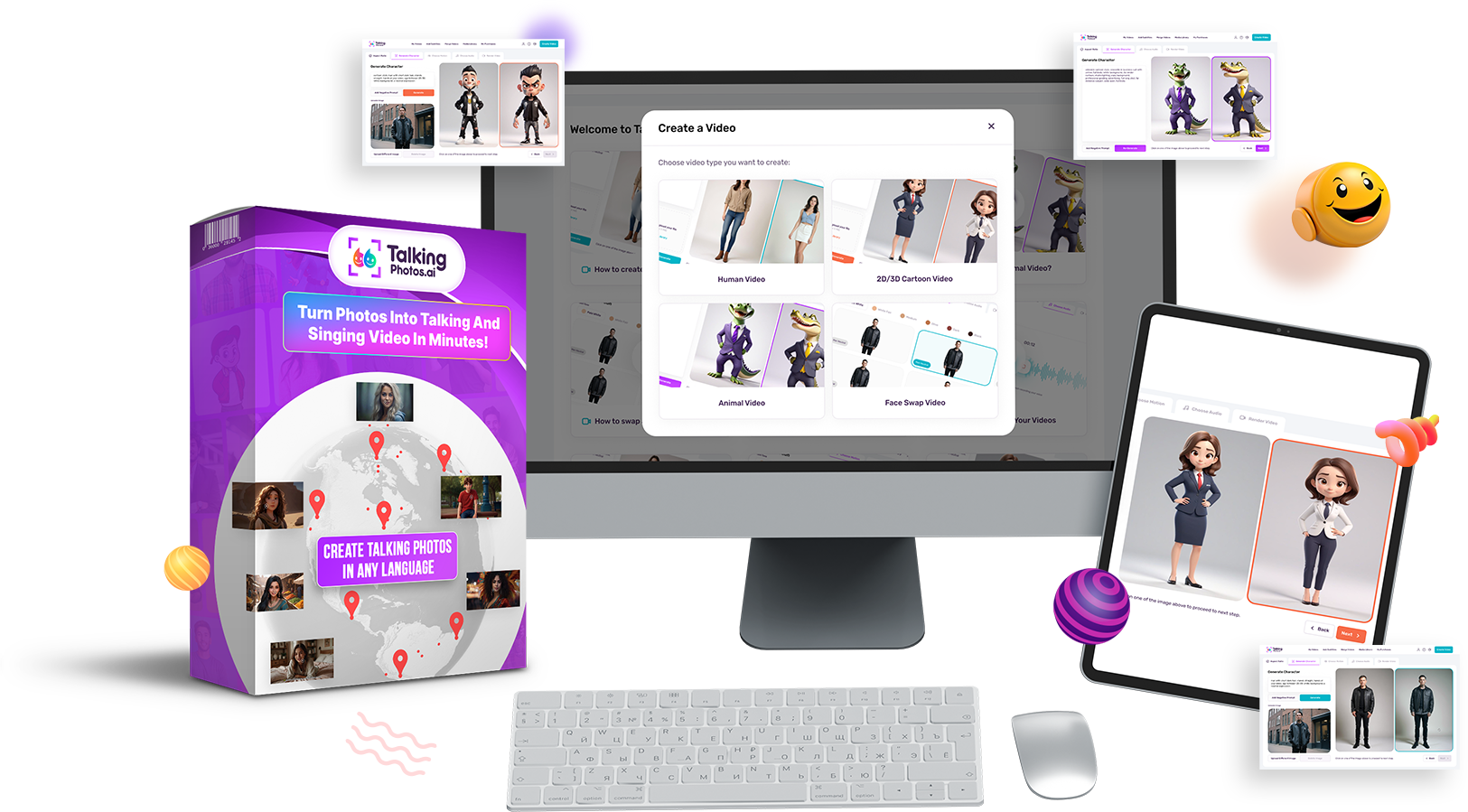
One of my favorite tools because it includes:
✅ Built-in text-to-speech
✅ Human video generation
✅ 2D and 3D video creation
✅ Fantasy and character styles
✅ Beginner-friendly workflow
✅ Regular training and tutorials
You can even upload your own voice if you prefer.
How to Create Your First Talking Video with TalkingPhotos AI
Once you’ve generated your UGC image and script, it’s time to bring everything to life.
TalkingPhotos AI makes the process simple—even if you’ve never created a video before.
Step 1: Click Create Video
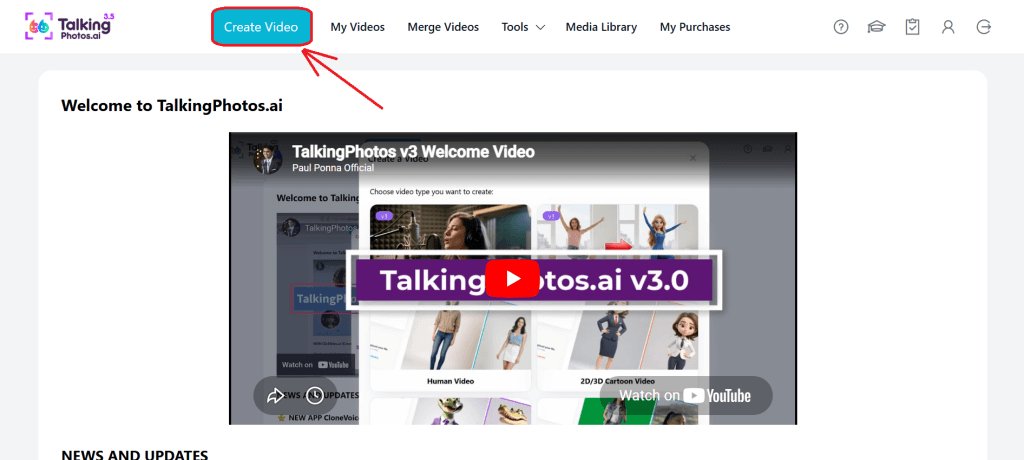
After logging into TalkingPhotos AI, click:
🚀 Create Video
Step 2: Choose Your Video Style
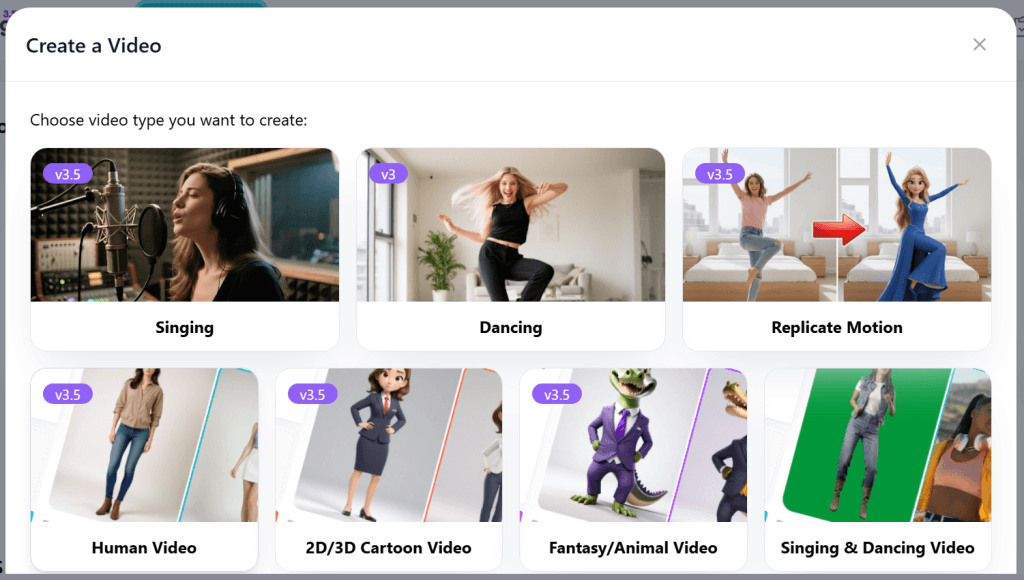
Select the type of video you want to create:
👤 Human Video
Perfect for realistic UGC videos.
🎨 2D Video
Great for animated explainer videos.
🧊 3D Video
Ideal for more cinematic or stylized content.
🦄 Fantasy Video
Perfect for fantasy characters and unique concepts.
🐶 Animal Video
Create talking pets and animal-style content.
💡 For affiliate marketing and UGC videos, I recommend starting with Human Video.
Step 3: Select Your Aspect Ratio
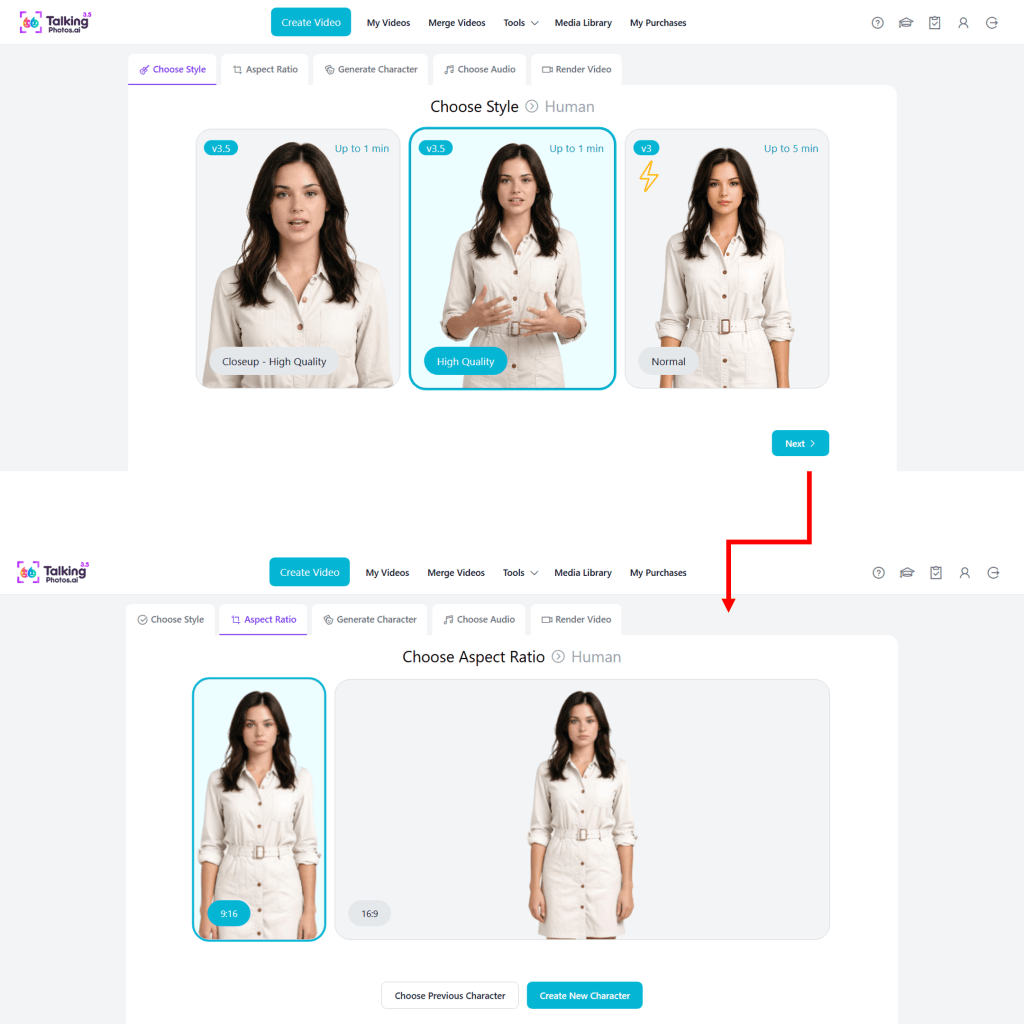
Choose the format based on where you plan to publish your content.
📱 9:16 Vertical
Best for:
- TikTok
- Facebook Reels
- Instagram Reels
- YouTube Shorts
🖥️ 16:9 Landscape
Best for:
- YouTube
- Sales Videos
- Presentations
- Blog Content
Step 4: Use Directly From Library

Click:
✅ Use Directly From Library
This allows you to select your AI-generated UGC image.
Step 5: Upload Your Assets
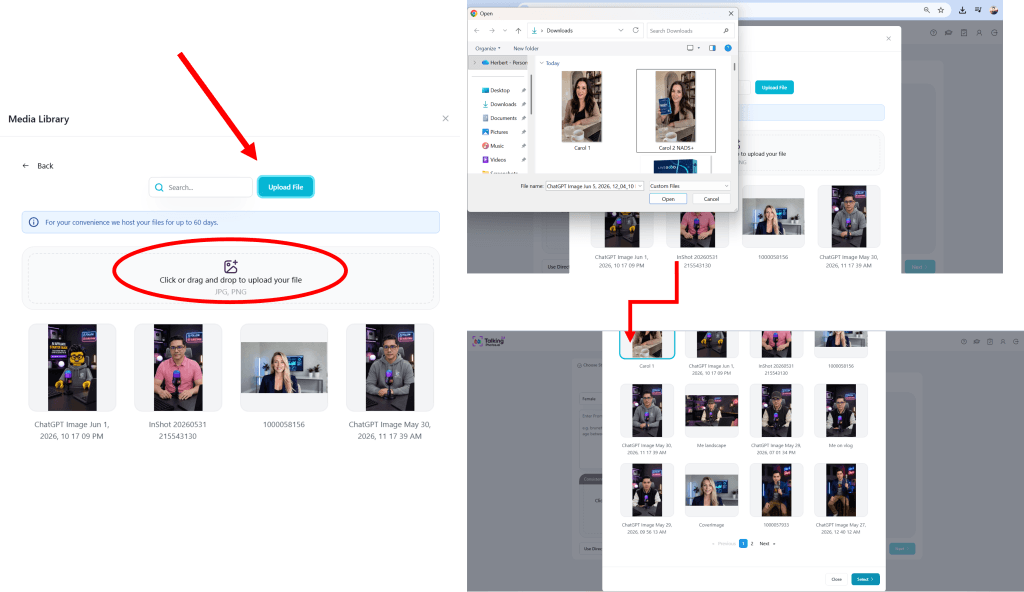
Upload:
📸 Your UGC Image
🎙️ Your Voiceover Audio
If you haven’t recorded a voiceover yet, don’t worry.
TalkingPhotos AI includes built-in voice generation.
Step 6: Choose Your Audio Source
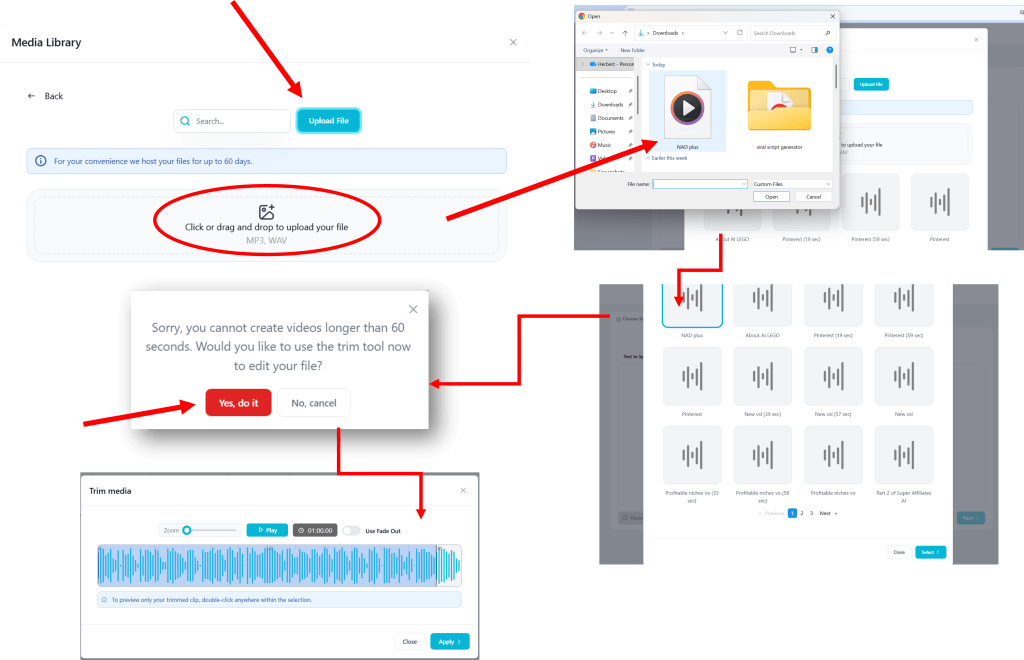
You have several options:
Built-in Text-to-Speech
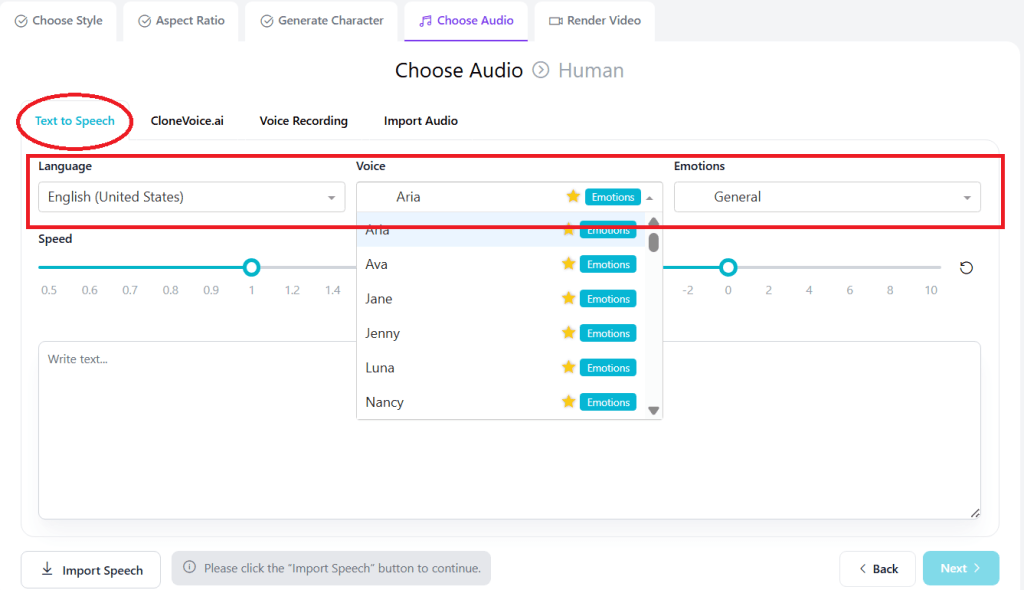
Simply paste your script.
TalkingPhotos will generate the voice automatically.
ElevenLabs
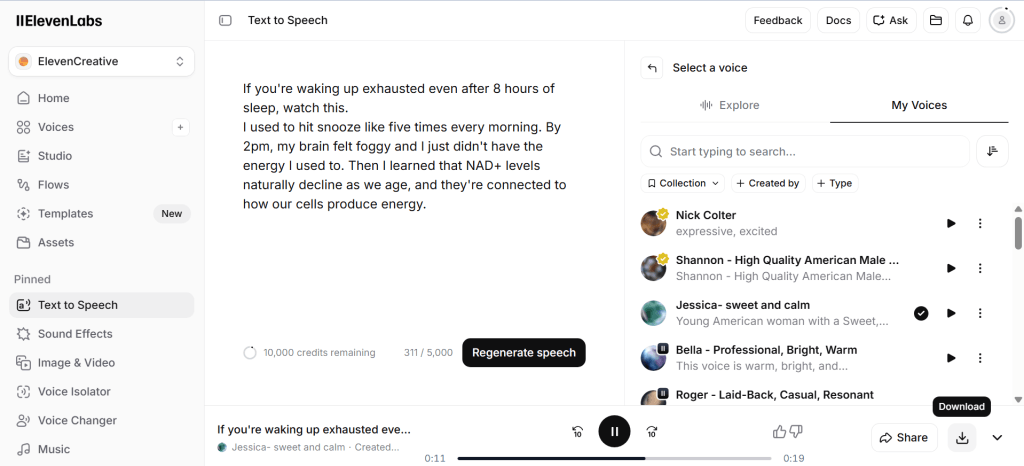
Generate a premium AI voice using ElevenLabs and upload the audio file.
Your Own Recording
Want maximum authenticity?
Record your own voice and upload it.
Step 7: Click Render

Once everything looks good:
🚀 Click Render
The system will automatically generate your talking video, and if you want to add effects or auto captions, you can use CapCut.
Why I Recommend TalkingPhotos AI
Many AI video platforms rely on a credit-based system.
That means you create a few videos, run out of credits, and then need to purchase more.
For beginners, those costs can add up quickly.
What I like about TalkingPhotos AI is that it offers a lifetime option, ongoing updates, training sessions, and a library of tutorials inside the members area.
For affiliate marketers and content creators, it can be one of the most cost-effective AI video solutions available.
Step Seven: Publish Everywhere
Once your video is complete, publish it across multiple platforms. (Click here to watch a sample UGC video.)
Recommended channels:
- TikTok
- Facebook Reels
- Instagram Reels
- YouTube Shorts
One video can generate traffic from multiple sources.
This allows you to maximize your content and reach more potential customers.
My Recommended AI UGC Workflow
Choose Product
↓
Gather Screenshots
↓
Generate UGC Image
↓
Create Script
↓
Generate Voiceover
↓
Create AI Video
↓
Publish Everywhere
↓
Generate Traffic
↓
Earn Commissions
Final Thoughts
Creating AI UGC videos for affiliate marketing no longer requires expensive equipment, professional actors, or advanced editing skills.
With the right workflow and tools, you can:
✅ Create content faster
✅ Promote affiliate offers
✅ Build an audience
✅ Generate traffic
✅ Scale your online business
The key is to start simple, stay consistent, and improve with every video you create.
Ready to Take the Next Step?
If you’d like access to my complete AI affiliate marketing system, recommended tools, traffic strategies, AI workflows, and beginner-friendly training…
🎁 Get the FREE AI Affiliate Starter Guide
Inside you’ll discover:
✅ AI Tools
✅ Affiliate Marketing Strategies
✅ Traffic Generation Methods
✅ Content Creation Workflows
✅ Pinterest Marketing Tips
✅ Beginner-Friendly Tutorials
And if you’re serious about accelerating your results, you can also explore the Pro Training section, which includes advanced video tutorials, implementation guides, and direct support.
🚀 Start building your AI-powered affiliate marketing business today.
2026 AI UGC Quality and Compliance Checklist
AI UGC can save production time, but viewers still respond to credibility. Before posting, review each video as if you were the customer seeing the product for the first time.
- Keep the product name, packaging, proportions, and key visual details consistent.
- Do not invent benefits, testimonials, prices, or before-and-after results.
- Disclose affiliate relationships and AI-generated presenters when required.
- Use a specific hook based on a real audience problem.
- Add captions, but verify every word instead of trusting automatic transcription.
- Export for the correct platform ratio and check the mobile safe area.
- Measure retention and clicks, then revise the hook before rebuilding the entire video.
If you want a broader camera-free channel workflow, see my MagicFlix AI 2.0 review with real sample videos. Beginners can also follow my complete AI affiliate marketing guide to connect content production with audience research and ethical promotion.


2 thoughts on “How to Create AI UGC Videos for Affiliate Marketing (Without Showing Your Face)”