
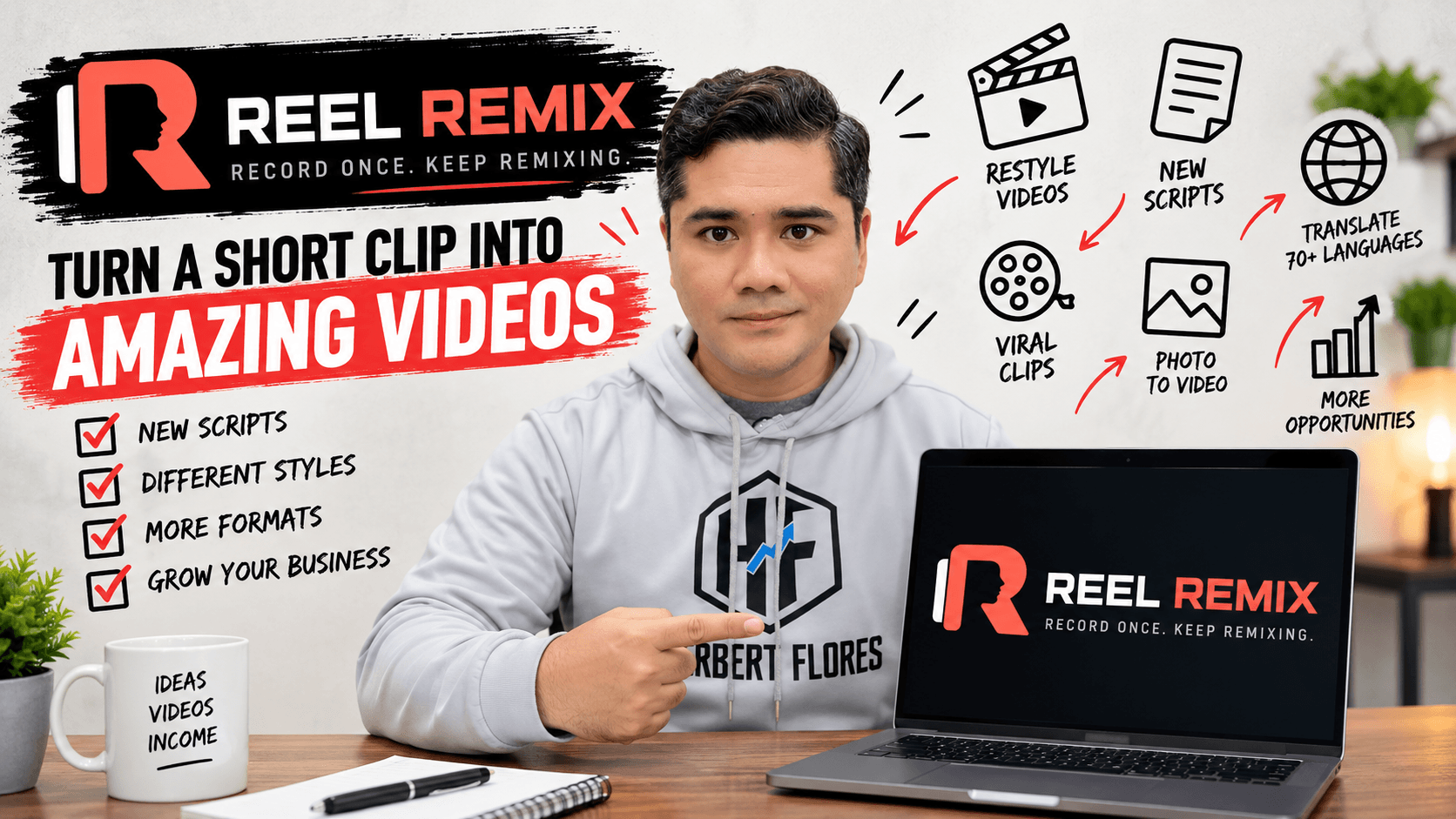
In this Reel Remix Review 2026, I’ll show you what happened when I personally tested this AI video platform and whether its “record 5 seconds” concept can really help you create more video content without constantly filming from scratch.
If you create videos for affiliate marketing, social media, your business, or clients, you probably know the most frustrating part of content creation:
You have to keep doing it.
Every new idea can mean another script, another recording session, more retakes, editing, captions, and resizing. That’s the problem Reel Remix is trying to solve.
New idea. New script. Set up the camera. Record. Make a mistake. Record again. Edit the footage. Add captions. Resize it. Publish it.
Then repeat the process tomorrow.
Reel Remix takes a different approach.
Instead of requiring you to record an entirely new video every time, it can start with a short source clip and use AI to help you turn that footage into additional videos, new scripts, different visual styles, captions, translations, short clips, and other variations.
The headline idea behind the software is surprisingly simple:
Record once. Keep remixing.
But does Reel Remix actually live up to that idea?
I’ve been testing it myself, and in this Reel Remix review I’ll show you what it does, how it works, the features I found most interesting, what I liked, what I didn’t like, and who I think should consider buying it.
I’ll also show you one of my actual Reel Remix tests rather than relying entirely on promotional demos.
Reel Remix Review: Quick Verdict
Reel Remix is an AI-powered video creation and repurposing platform designed to help creators get more content from a small amount of source footage.
You can start with a short video—or even a still image—and use the platform to create additional scripted footage, Restyle existing videos, clean up raw recordings, add captions, translate videos, reframe them for different platforms, and repurpose longer content into short clips.
What impressed me most during my own testing was Restyle.
I’m used to creating promotional videos myself, and producing highly stylized visuals manually can take me hours. Seeing Reel Remix transform ordinary footage into a completely different visual treatment without me manually rebuilding every scene was the feature that made me pay attention.
However, I don’t think the software is perfect, and there are a few limitations I’ll discuss later in this review.
My rating: 4.3/5
Best for: Affiliate marketers, content creators, coaches, freelancers, agencies, local businesses, and marketers who regularly need short-form video content.
Biggest strength: Turning existing footage into more usable content without constantly filming from scratch.
My favorite feature: Restyle.
Important limitation: AI-generated faces, motion, and voice can still occasionally show inconsistencies depending on the source material and generation.
👉 CHECK THE CURRENT REEL REMIX OFFER
What Is Reel Remix?
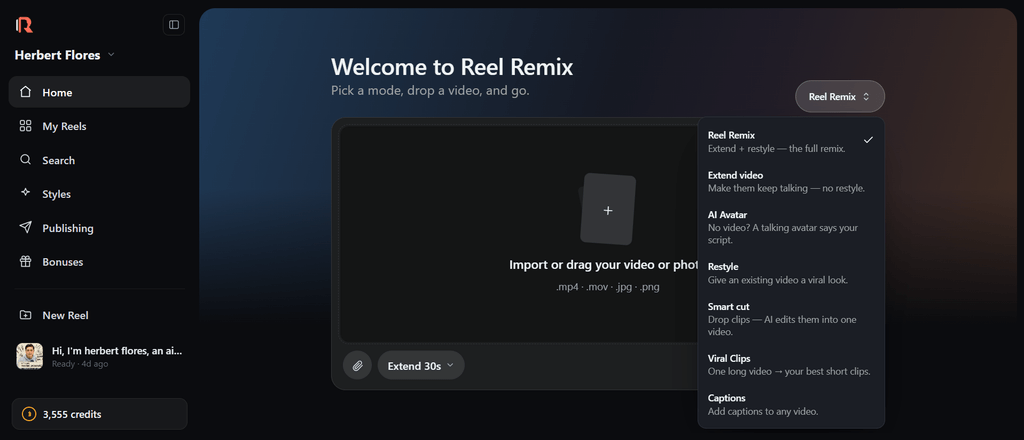
Reel Remix is an AI video platform built around a simple concept:
Give AI a small amount of source material and use it to create much more content.
The most attention-grabbing example is its Extend workflow.
You can record a short source clip, provide a new script, and have Reel Remix generate additional scripted video based on that original person and source footage. The platform can also work with cloned voice data rather than requiring you to record every new line manually.
But Reel Remix isn’t only a “5-second video extender.”
The platform combines several AI video tools inside one workflow:
- Extend — turn short source footage into additional scripted video.
- Restyle + Clean Cut — transform the visual appearance of footage or tighten the original video without applying an AI style.
- Smart Cut — combine raw takes, remove unwanted sections, and turn them into a cleaner finished video.
- Viral Captions — automatically add timed captions.
- Voice Cloning — generate new speech based on the source person’s voice.
- Translate — create multilingual versions with voice-matched dubbing and lip sync.
- Reframe — adapt finished videos for vertical, square, or landscape formats.
- Upscale — produce higher-resolution 2K or 4K output on eligible plans.
- Viral Clips — turn podcasts, webinars, or linked content into short-form clips.
- Photo to Video — start from a still image when you don’t have source footage.
- Face or Faceless — create around an on-camera person or produce faceless content.
That makes Reel Remix closer to an AI video production and repurposing system than a single-purpose AI generator.
Watch My Reel Remix Demo
Before I go deeper into the features, here’s my own Reel Remix demonstration.
I wanted to see what the actual workflow looked like rather than simply reading the feature list.
Watch my Reel Remix demo on YouTube
This is my actual Reel Remix test. I started with source material, ran it through the Reel Remix workflow, and recorded the process so you can see how the platform works before deciding whether it’s right for you.
How Does Reel Remix Work?
The exact process depends on which feature you’re using, but the basic idea is straightforward.
You start by giving Reel Remix something to work with.
Ideally, that’s a short video of yourself or your client. Reel Remix’s own materials recommend starting with video for the fullest experience because it provides natural movement and voice information. If video isn’t available, you can also start from a still image.
From there, you choose what you want Reel Remix to do.
For example, with Extend, you can provide a new script and generate additional video instead of recording the entire new script yourself.
With Restyle, you start with existing footage and transform its visual world.
With Smart Cut, you give it your raw takes and let the software help assemble them into cleaner content.
That’s why I think “Reel Remix” is actually a good description of the product.
You’re not always creating from zero.
You’re taking something you already have and turning it into something else.
Reel Remix Extend: Record a Short Clip and Create More
This is probably the feature that will initially get most people’s attention.
Instead of recording a complete 30-second or 60-second script, you can begin with a short source clip.
You then provide the new script you want the person to say.
Reel Remix uses the source footage and cloned voice to create additional scripted video.
Think about what that could mean for someone producing content every week.
Instead of:
Idea → Script → Camera → Recording → Retakes → Editing
you potentially move toward:
Source Clip → New Script → AI Generation → Final Edit
That doesn’t eliminate every part of video production, and I wouldn’t pretend it does.
You’ll still want to review the output, choose your strongest generations, polish your final edit, and make sure everything looks and sounds right.
But reducing the amount of repeated filming is valuable if video production is one of the bottlenecks in your business.
Reel Remix Restyle: My Favorite Feature
This is where Reel Remix became much more interesting to me personally.
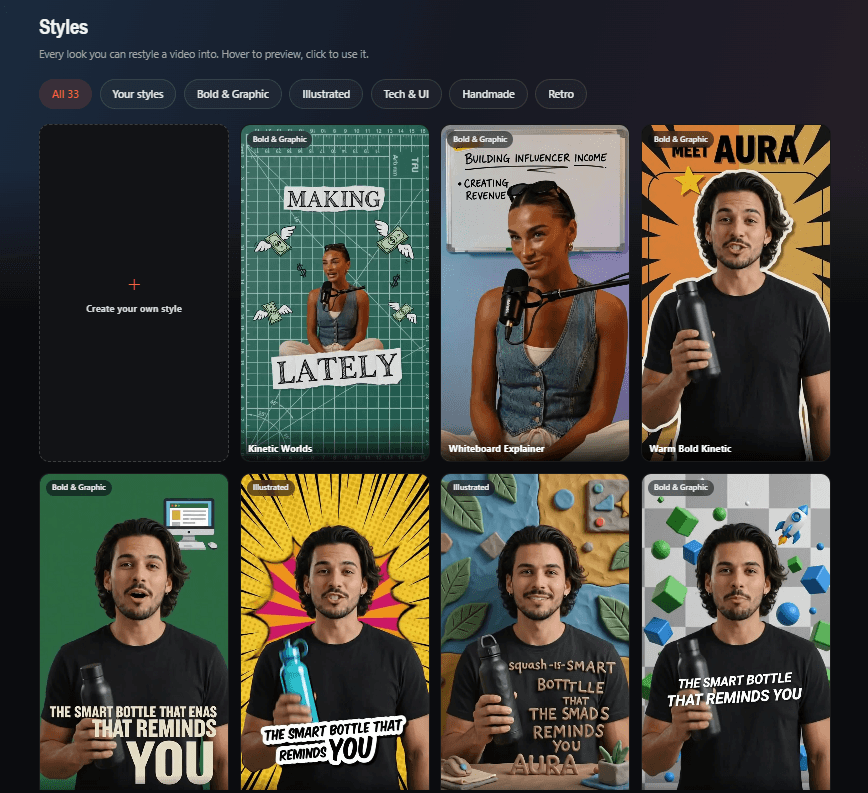
Restyle takes ordinary footage and changes the visual world around it.
The official examples include cinematic, animated, 3D, and other visual treatments while attempting to keep the original person recognizable.
Why does that matter?
Because creating visually elaborate videos manually can take a ridiculous amount of time.
I’ve personally spent around four hours manually creating visual styling for a one-minute promotional video.
That changes the way I look at an AI Restyle feature.
I’m not simply asking:
“Can AI make this look cool?”
I’m asking:
“Can this save me hours of production time?”
In my testing, that’s where I saw some of Reel Remix’s strongest potential.
Take a normal talking video and suddenly it can become something visually much more attention-grabbing without manually creating every effect from scratch.
For affiliate marketers and social media creators, that can give you another way to make promotional videos stand out in crowded feeds.
For freelancers and agencies, it can also become something you offer to clients.
Reel Remix Smart Cut
Not every useful AI feature needs to look futuristic.
Sometimes you just want AI to handle boring editing work.
That’s what Smart Cut is designed for.
Instead of carefully trimming several raw recordings yourself, you can provide Reel Remix with your takes and let it identify usable sections, remove dead air, tighten the footage, and add captions.
The company’s example is essentially:
messy takes → polished reel.
If you regularly record talking-head videos, tutorials, product reviews, UGC-style videos, or client content, this may actually be one of the more practical everyday features.
Viral Captions
Reel Remix also includes automated captioning.
Captions are particularly useful for short-form platforms because viewers may encounter your content before deciding whether to turn their sound on.
Instead of sending your video to another application just to create subtitles, Reel Remix can add timed caption styles as part of the workflow.
It’s not the flashiest feature, but combining generation, editing, styling, and captions inside the same production workflow can reduce the number of tools you need to jump between.
Voice Cloning
Reel Remix can use the source person’s voice when creating additional scripted content.
This is particularly important for the Extend workflow.
Without it, you’d potentially have new AI footage but a completely different voice.
However, this is one area where I’d keep expectations realistic.
I’ve experimented with a lot of AI voice technology, and voice cloning quality can vary depending on the source recording, microphone quality, speech characteristics, and the model being used.
I wouldn’t buy Reel Remix solely because you’re expecting a flawless replacement for your real voice.
For me, the bigger value is the overall video-production workflow.
Translate Videos Into 70+ Languages
The Go Global component expands Reel Remix beyond English-language content.
According to the current Reel Remix materials, it supports translation into 70+ languages, along with voice-matched dubbing and lip synchronization.
This could be particularly interesting for:
international affiliate campaigns, multilingual businesses, creators trying to reach new audiences, agencies serving clients in different markets, and marketers repurposing successful videos instead of recreating them from scratch for every language.
One successful piece of content potentially becomes the starting point for multiple localized versions.
Reframe Videos for TikTok, Reels, Shorts and More
We’ve all had this problem.
You make a video in one aspect ratio and then realize you need another version for a different platform.
Reel Remix’s Reframe feature is designed to adapt finished content into formats such as:
9:16 vertical, 1:1 square, and 16:9 landscape, while keeping the main subject properly framed.
That’s useful if you’re distributing the same core content across TikTok, Instagram Reels, Facebook, YouTube Shorts, YouTube, and other channels.
Create once.
Then adapt instead of rebuilding.
Turn Long Videos Into Short Clips
The Viral Clips component is designed for a different problem.
Instead of starting with five seconds, you can go the opposite direction and start with something long.
For example:
A podcast.
A webinar.
A long-form video.
Or supported linked content.
Reel Remix can identify moments that may work as shorter clips, tighten them, add captions, and format them for short-form platforms.
For creators already sitting on a library of long-form content, this could be more valuable than generating completely new videos.
Your existing content may already contain dozens of potential Shorts or Reels.
Can You Use a Photo Instead of Recording Video?
Yes.
This is another feature I tested because I know plenty of people don’t want to constantly appear on camera.
Reel Remix supports photo-to-video generation.
You can upload a still image and have the platform put that image into motion. However, Reel Remix’s own materials state that starting with actual video provides richer source information, including natural movement and voice.
And this matches my experience.
My recommendation:
If possible, start with a real short video rather than only a photo.
In my testing, source video generally gave me a better foundation for maintaining the person’s natural appearance.
With AI-generated photo animation, I have seen occasional changes in facial appearance or movement.
That doesn’t make photo-to-video useless.
It just means I wouldn’t automatically assume a single photograph will always produce the same consistency as real source footage.
What I Like About Reel Remix
After actually using it, these are the areas that stand out to me most:
Restyle can save serious production time. This is the biggest one for me. If you’re accustomed to manually building visual treatments, the ability to transform footage quickly is genuinely useful.
It starts with content you already have. I like the philosophy behind this. You don’t always need another filming session.
It combines several workflows. Extend, Restyle, Smart Cut, captions, translation, reframing, and repurposing solve different parts of the same content-production problem.
It has commercial-use potential. You’re not limited to creating your own social content. Agencies and freelancers can use the same workflow for client projects. Reel Remix itself specifically positions the platform for both personal content creation and client services.
The result is easy to demonstrate. This matters more than people think. Showing someone an ordinary source clip beside a dramatically Restyled version communicates the value much faster than explaining AI technology for ten minutes.
What I Don’t Like About Reel Remix
No Reel Remix review would be useful if I pretended everything was perfect.
There are several things you should understand before buying.
1. AI video isn’t perfectly consistent
Depending on your source material and the transformation you’re requesting, facial details can sometimes change.
I’ve seen cases where a face becomes slightly wider, older-looking, or otherwise different from the source.
This isn’t unique to Reel Remix—identity consistency is still a challenge across generative AI video—but it matters if you’re creating videos for yourself or paying clients.
2. Photo-to-video isn’t my preferred starting point
I like having the option, but based on my testing, I’d rather give the AI a short piece of real video whenever possible.
More source information gives the system more to work with.
3. Generation uses credits
This is important.
“Unlimited projects” does not necessarily mean unlimited AI generations.
The current offer distinguishes unlimited projects/exports/workspaces from the credits used for AI production.
That means failed generations and experimentation can have a real cost.
I recommend learning which source footage and styles work best before repeatedly regenerating a project.
4. You still need judgment
AI doesn’t magically know whether a hook is good, whether your offer makes sense, or whether the final video will convert.
The tool can accelerate production.
You still need the marketing idea.
That’s an important distinction.
Can You Make Money With Reel Remix?
This may actually be one of the more interesting parts of Reel Remix.
There are two main ways I see marketers potentially making money with it.
Use Reel Remix to promote what you already sell
If you’re an affiliate marketer, coach, business owner, course creator, or online seller, you can use Reel Remix to produce more promotional content.
One source video could potentially become:
different hooks, different promotional angles, Restyled versions, platform-specific versions, translated versions, and short-form variations.
More content doesn’t guarantee more sales.
But it gives you more opportunities to test messages and put your offers in front of people without requiring a completely new production process every time.
Sell AI video creation as a service
This is the second opportunity.
You could use Reel Remix behind the scenes to produce content for:
local businesses, coaches, real estate agents, influencers, affiliate marketers, e-commerce businesses, consultants, and other creators.
And you’re not really selling “AI.”
You’re selling the result.
A restaurant wants videos promoting its food.
A realtor wants consistent property content.
A coach wants polished videos.
A business wants more visibility.
They don’t necessarily care which buttons you press behind the scenes.
The official Reel Remix material makes this same point: agencies and freelancers can use the workflow for short-form packages, video Restyling, podcast/webinar repurposing, multilingual videos, and platform-ready variations.
That’s why I see Reel Remix as potentially more than a content tool.
It can also become part of a service business.
Reel Remix Reseller License
The Founders Bundle takes the commercial angle further by including reseller functionality.
According to the current offer, Reel Remix Reseller supports up to 25 managed customer accounts. You can create customer seats, allocate credits, track usage, enable or disable accounts, and manage customer credit top-ups.
This gives you another potential business model.
Instead of only delivering finished videos, you could potentially package access to the production system for your customers.
Again, I would treat this as a business opportunity, not an income guarantee.
Having reseller rights doesn’t automatically produce customers.
You’ll still need an offer, positioning, outreach, sales, and customer support.
But I like having the option.
What’s Included With Reel Remix?
At the time of writing, the Founders offer combines several products that are planned to be sold separately later.
The published standard funnel lists:
| Product | Listed Standard Price |
|---|---|
| Reel Remix Commercial | $47 |
| Pro Unlimited | $67 |
| Go Global | $67 |
| Viral Clips | $47 |
| Reseller | $197 |
| Listed Total | $425 |
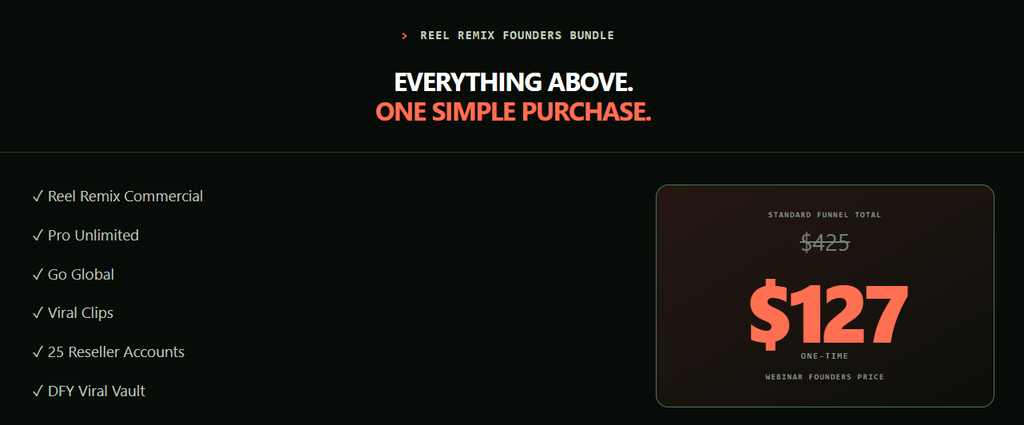
The current Founders Bundle combines Commercial, Pro Unlimited, Go Global, Viral Clips, reseller functionality for up to 25 accounts, and the DFY Viral Vault.
The opening Founders price was $127, but the offer uses market pricing that can increase as customers join, so I recommend checking the live page rather than relying on a price quoted in an older review.
👉 CHECK TODAY’S REEL REMIX PRICE
Reel Remix Bonuses
The current offer also includes several implementation-focused bonuses:
Viral Hook Script Library helps you start videos with hook ideas instead of staring at a blank script.
DFY Caption Style Pack provides caption treatments for finished content.
First Viral Short in 24 Hours provides a quick-start implementation process.
30-Day Post Calendar gives you content angles and prompts for a month.
Restyle Look-Book provides visual-style ideas for different niches.
Client-Getting Agency Kit focuses on turning Reel Remix into a client service, including positioning and pricing guidance.
I actually like the direction of these bonuses because the biggest problem with buying AI software isn’t usually accessing another feature.
It’s figuring out:
“Okay… what should I actually create with this?”
Reel Remix Founders Bundle vs Mega Bundle
There is also an optional Reel Remix Mega Bundle.
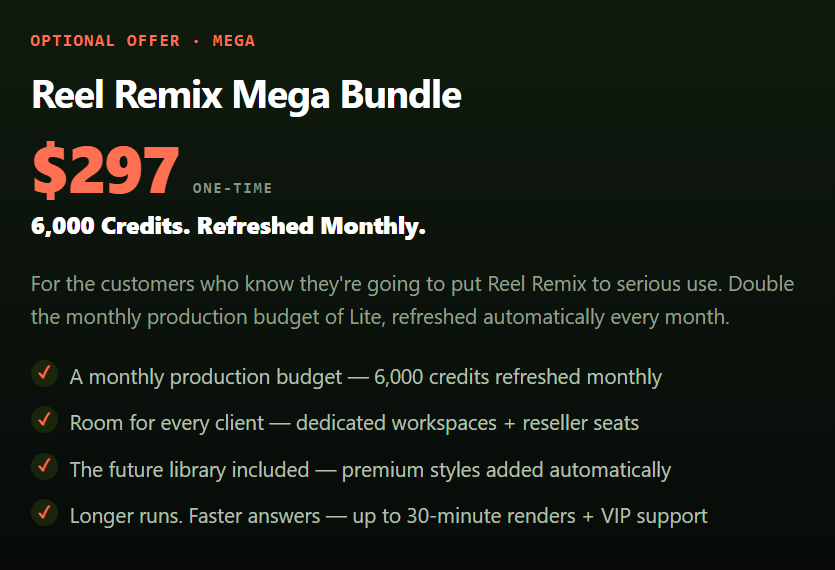
The current partner materials list Mega at $297 one-time, with a larger monthly production-credit allowance.
My recommendation?
Most people shouldn’t automatically jump to Mega.
Start by asking how heavily you’re actually going to use Reel Remix.
If you’re producing a large volume of client videos and repeatedly running AI generations, additional monthly credits could become valuable.
If you’re just learning the platform and producing content for yourself, I’d first prove that Reel Remix fits your workflow before buying more production capacity.
Who Should Consider Reel Remix?
I think Reel Remix makes the most sense for people who already understand why they need video but are struggling with how much time it takes to produce enough of it.
That includes affiliate marketers who need promotional videos, content creators trying to post consistently, businesses creating social content, coaches and consultants building personal brands, freelancers producing client content, agencies managing multiple clients, and creators who want to repurpose podcasts or webinars.
I think it’s less compelling if you rarely create video, don’t have an offer or audience you’re trying to reach, or expect AI to handle your entire marketing strategy automatically.
Reel Remix solves a production problem.
It doesn’t replace having something worthwhile to say.
Is Reel Remix Beginner-Friendly?
For the core workflows, I think so.
You don’t need traditional video-editing skills to understand the basic process.
Upload your source.
Choose what you want to do.
Add your script or settings.
Generate.
Review the result.
That said, beginners should expect some experimentation.
AI video generation isn’t like applying a normal Instagram filter where the result is completely predictable.
Your source image, lighting, framing, movement, style selection, and other variables can affect the output.
After a few generations, you’ll start learning what works best.
Reel Remix Pros and Cons
Pros
- Start with very short source footage
- Create additional scripted videos
- Powerful Restyle workflow
- Smart Cut for raw recordings
- Automated captions
- Voice cloning
- 70+ language translation on the relevant package
- Lip-sync localization
- Multiple aspect ratios
- 2K/4K upscaling options
- Long-form to short-form repurposing
- Photo-to-video option
- Commercial-use potential
- Client-service opportunity
- Reseller functionality in the Founders Bundle
- Useful implementation bonuses
Cons
- AI generations aren’t always perfectly consistent
- Faces can occasionally change during aggressive transformations
- Photo-only input may be less consistent than real video
- AI generation consumes credits
- Some generations may require retries
- Voice cloning may not perfectly match every person’s natural voice
- You still need good hooks, scripts, offers, and marketing strategy
Reel Remix FAQ
Is Reel Remix legit?
Reel Remix is a functioning AI video platform that I have personally tested. I’ve used its actual generation workflow and created my own demonstration rather than basing this review only on sales-page claims.
What does Reel Remix do?
Reel Remix uses AI to turn source footage or images into additional video content. Depending on the feature and package, it can extend videos with new scripts, Restyle footage, edit raw takes, create captions, clone voices, translate videos, reframe content, upscale output, and turn long-form content into shorter clips.
Can Reel Remix really start with five seconds of video?
Yes. The Extend workflow is specifically designed around using a short source clip as the foundation for additional scripted video.
Can I use a photo with Reel Remix?
Yes. Reel Remix includes a photo-to-video input option. However, the company’s own materials recommend actual video when available because it provides richer source information.
Can Reel Remix clone my voice?
Reel Remix includes voice cloning for generating speech based on the source person’s voice. Results can vary, so I recommend testing it with your own source material before relying on it for important client projects.
Can Reel Remix translate videos?
The Go Global component advertises translation into more than 70 languages with voice-matched dubbing and lip sync.
Can I use Reel Remix for client work?
Yes. The Commercial package includes a commercial license, and the Founders Bundle also includes reseller functionality designed for managing customer accounts.
Is Reel Remix unlimited?
Be careful with the word “unlimited.” Pro Unlimited lists unlimited projects, exports, and workspaces, but AI generation operates using credits.
How much does Reel Remix cost?
The Founders offer launched at $127, but its current pricing model can adjust upward as members join. The planned separate standard funnel totals $425 based on the currently listed component prices. Because the live price can change, check the current offer before purchasing.
👉 CHECK CURRENT REEL REMIX PRICING
Reel Remix Review 2026: Final Verdict
After testing Reel Remix myself, I don’t think its biggest selling point is simply that it can make an AI video.
There are already plenty of tools that can do that.
The more interesting idea is getting more mileage from content you’ve already created.
Record a short source clip.
Turn it into another scripted video.
Take ordinary footage and Restyle it.
Turn messy recordings into cleaner content.
Translate a successful video.
Resize it for another platform.
Turn a webinar into Shorts.
Or use the same production system to create videos for paying clients.
That’s a much more interesting workflow to me than simply generating random AI clips.
For my own work, Restyle is currently the feature I find most valuable because I’ve experienced how long this kind of visual production can take manually.
At the same time, Reel Remix isn’t magic.
AI generations can occasionally change facial details. Voice cloning isn’t guaranteed to be perfect. Generations use credits. And you’ll still need good ideas, hooks, scripts, offers, and marketing.
But if your problem is:
“I need more video content, but I don’t want to constantly film and spend hours editing everything from scratch,”
then Reel Remix is worth looking at.
And if you’re a freelancer or agency owner, there’s another question worth asking:
“Could I use the same workflow to create content for clients and get paid for it?”
For me, that’s where Reel Remix becomes more than another AI toy.
It becomes a content-production system that can potentially support both your own marketing and a service business.
My Reel Remix Rating: 4.3/5
Recommended for: Affiliate marketers, content creators, businesses, freelancers, and agencies that regularly produce video.
👉 GET REEL REMIX / CHECK CURRENT FOUNDERS PRICE
As always, don’t buy software because of hype or income claims. Buy it if the workflow solves a real problem in your business and you can see yourself actually using it.


