
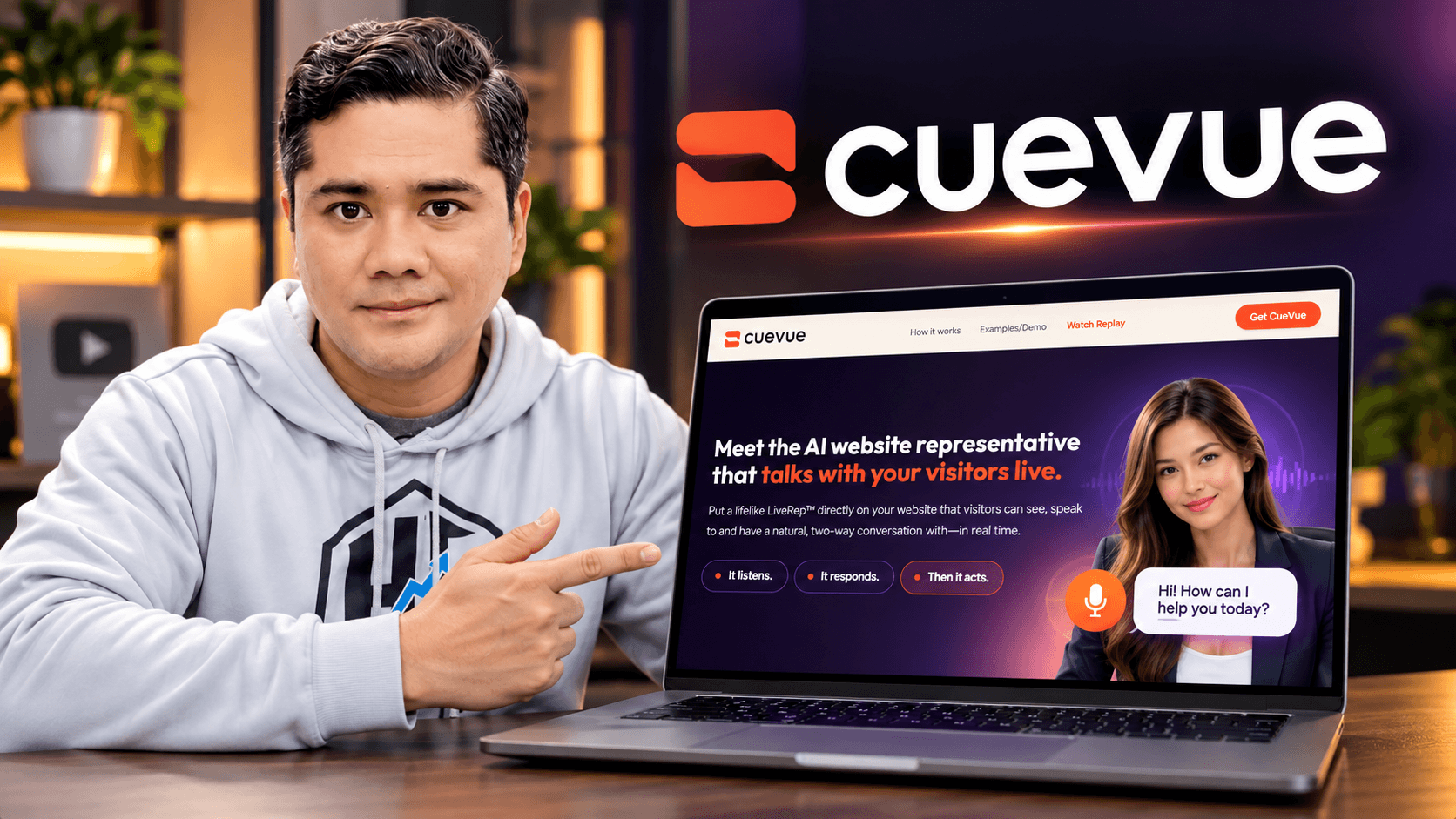
AI chatbots are everywhere now.
But when I first saw CueVue, what caught my attention wasn’t another chat box in the corner of a website.
It was the idea of putting a lifelike AI representative on a website that visitors could actually talk to.
Not just click preset questions.
Not just watch an avatar read a script.
They could have an actual two-way conversation with it.
I’ve now used CueVue on my own websites, demonstrated it to other people, and introduced it to a friend and client who eventually decided to use the platform for his own business.
So rather than writing another generic CueVue review based only on the sales page, I want to show you what I’ve actually experienced with it, how the platform works, what it costs, and how I think business owners and agencies could use it.
👉 Check out CueVue here:
https://tinyurl.com/talkingsite
Disclosure: This article contains my affiliate link. If you purchase through my link, I may earn a commission at no additional cost to you.
What Is CueVue?

CueVue is an AI-powered website engagement platform built around technology called LivePresence™.
The AI representatives you create inside CueVue are called LiveReps™.
The easiest way to understand the concept is to compare it with a traditional website.
Normally, when someone lands on your website, everything is passive.
They read your headline, scroll through your content, look at your products or services, and hopefully find whatever information they need.
If they have a question that isn’t answered on the page, they either have to contact you, use a traditional chatbot, or leave.
CueVue adds another option.
A visitor can interact with a lifelike AI representative directly on the website. The LiveRep can listen to the visitor, understand the question and respond using information about the business.
But what I find particularly interesting is that the LiveRep can also be given a specific job or mission.
It isn’t there simply to look impressive.
You might configure it to answer questions, capture a lead, qualify a prospect, help someone understand your products or services, or move the conversation toward an appointment or another next step.
CueVue summarizes the concept nicely:
It listens. It responds. Then it acts.
Watch My CueVue Demo and Tutorial
You Can Also Watch CueVue Webinar Replay
I’d put the video right here near the beginning of the article, not at the bottom.
At this point, readers understand what CueVue is, but they haven’t had to read thousands of words about it yet.
Instead of me trying to explain everything, they can actually see the technology in action first.
Underneath the embedded video, continue with:
Once you’ve seen the LiveRep in action, the concept makes a lot more sense. Now let me show you what it’s like from the account owner’s side.
Inside My CueVue Dashboard
Here’s a look inside my actual CueVue account. This is one of the reasons I wanted to include my own screenshots in this review rather than simply repeating information from a sales page.
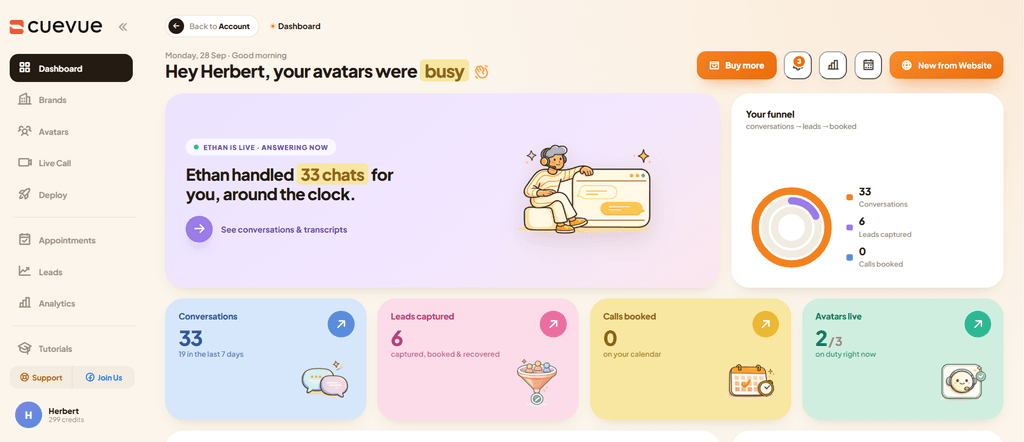
Inside my CueVue dashboard showing conversations, leads captured, active LiveReps and account activity.
Your screenshot is especially good because it shows real activity:
33 conversations, 6 leads captured, and 2 of 3 avatars live at the time the screenshot was taken.
I wouldn’t present those numbers as a promise of what another user will get. They’re simply a snapshot of activity inside my own account.
And that’s one of the things I like about the CueVue dashboard.
You’re not limited to seeing whether an avatar is online.
You can monitor things like conversations, transcripts, leads, appointments, analytics and LiveRep activity from the dashboard.
Managing Multiple Brands and AI LiveReps
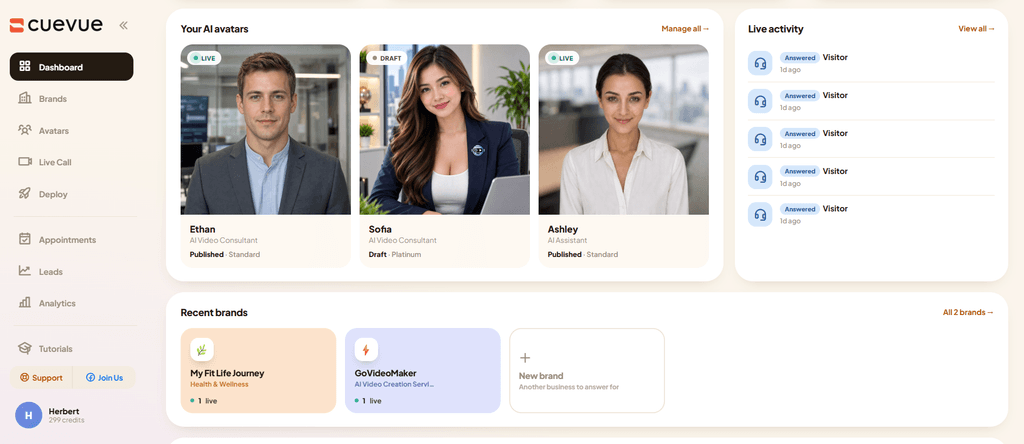
My CueVue account showing multiple AI LiveReps and separate brands for My Fit Life Journey and GoVideoMaker.
At the time of this screenshot, I had multiple LiveReps inside my account, including Ethan, Sofia and Ashley, with separate business brands for My Fit Life Journey and GoVideoMaker.
This is useful because I’m not experimenting with CueVue on only one test page.
I’m using it across different business ideas and seeing how the LiveRep concept fits different types of websites.
Real Websites Where I’m Using CueVue
One reason my view of CueVue has changed since I first discovered it is that I’ve had a chance to move beyond the demo stage.
I’ve actually put LiveReps on websites.
My Fit Life Journey — Health and Wellness E-Commerce
One example is my health and wellness e-commerce website:
Visit My Fit Life Journey Shop
An e-commerce site is an interesting use case because visitors often have questions while they’re browsing.
Instead of expecting someone to read every page or product description, a LiveRep provides another way for visitors to interact with the website.
Of course, particularly with health and wellness products, the AI should stay within the approved business/product information and shouldn’t be treated as a replacement for professional medical advice.
True Swiss Wellness — Client Website
I’ve also been involved in bringing the technology to:
This belongs to my friend and client Ely Martos.
And there’s actually a story behind how that happened.
How Sharing CueVue With a Friend Turned Into My First Client
When I started experimenting with CueVue, I shared it with Ely.
I didn’t give him some complicated presentation about conversational AI or try to overwhelm him with technical details.
I showed him what it could do.
We talked about the technology, and the following day we met and discussed it further.
What interested him wasn’t only having an AI representative on one website.
He could see how something like this might potentially help his business network grow globally and how members of his team could also recommend or use this kind of technology.
He eventually decided to get the CueVue All Access Bundle.
For me, that was an important experience because it showed me something about selling AI services:
Sometimes It’s Easier to Show AI Than Explain AI
Tell a business owner that you provide “AI-powered conversational website automation,” and you might spend the next ten minutes explaining what that means.
Put a LiveRep in front of them and say:
“Talk to it.”
Now they understand.
My experience with Ely is simply my own experience, of course. It isn’t a promise that showing CueVue to someone will automatically turn that person into a paying client.
But it made me start looking at CueVue differently.
I wasn’t seeing only an affiliate product anymore.
I was seeing something I could potentially offer as a service.
Who Is CueVue For?
I can see CueVue being useful for two broad groups.
Business Owners
A business owner could use a LiveRep on their own website to help:
- Answer common visitor questions
- Explain products or services
- Handle initial inquiries
- Capture prospect information
- Qualify leads
- Guide visitors toward an appointment
- Provide basic customer support
- Direct visitors toward the appropriate next step
The important part is giving the LiveRep accurate business knowledge and a clear mission.
Agencies, Freelancers and Marketers
The second group is where things become especially interesting.
If you already provide websites, video marketing, lead generation, automation, social media or other digital services, CueVue could become an additional service you offer to clients.
That might include:
- Web designers
- Digital marketing agencies
- Video agencies
- Local business marketers
- Freelancers
- Consultants
- Coaches
- Network marketers
- Lead-generation specialists
- Automation service providers
You don’t necessarily have to sell your customer “AI software.”
You could sell a managed AI LiveRep service.
CueVue Pricing After the Founder’s Launch
This is an important distinction because the Founder’s Launch / special Access Bundle isn’t the normal long-term offer.
The information I’ve received is that once the special launch bundle ends, the regular CueVue front-end returns to $37 and CueVue moves into its standard funnel.
That means someone discovering CueVue after the launch shouldn’t assume they’re receiving every component that was included in the special All Access Bundle for that $37.
There may be additional upgrades depending on what they want to do with CueVue.
👉 Check the current CueVue pricing and offer here:
https://tinyurl.com/talkingsite
Because offers can change, I’d recommend checking the current sales page rather than relying only on pricing mentioned in an older review.
CueVue Agency: Turning LiveReps Into a Client Service
If your main interest is using CueVue with clients, this is the part I’d pay attention to.
The CueVue Agency upgrade is listed with a $197 value and is designed to make managing multiple client projects easier.
The Agency capabilities include:
10 Separate Client Workspaces
Instead of mixing different businesses together, you can maintain separate workspaces for up to 10 clients.
Individual Credit Pools Per Client
Each client’s usage can be managed separately, which becomes much more important once you’re charging businesses for a managed service.
Read-Only Client Sub-Logins
Clients can be given access to view their account information without necessarily giving them control over your main agency account.
White-Labeled Client Dashboard and Reporting
For an agency, this is particularly useful.
Instead of constantly positioning CueVue itself as the service, you have the ability to build your own client-facing AI LiveRep service and provide reporting under your agency branding.
Separate Client Data, Leads and Conversations
Client information stays separated rather than mixing leads and conversations from different businesses together.
How CueVue Credits Actually Work
Here’s one correction that’s important to understand:
CueVue uses its own credit system.
When you need additional usage, you can purchase more credits directly from inside your account.
CueVue Credit Pricing
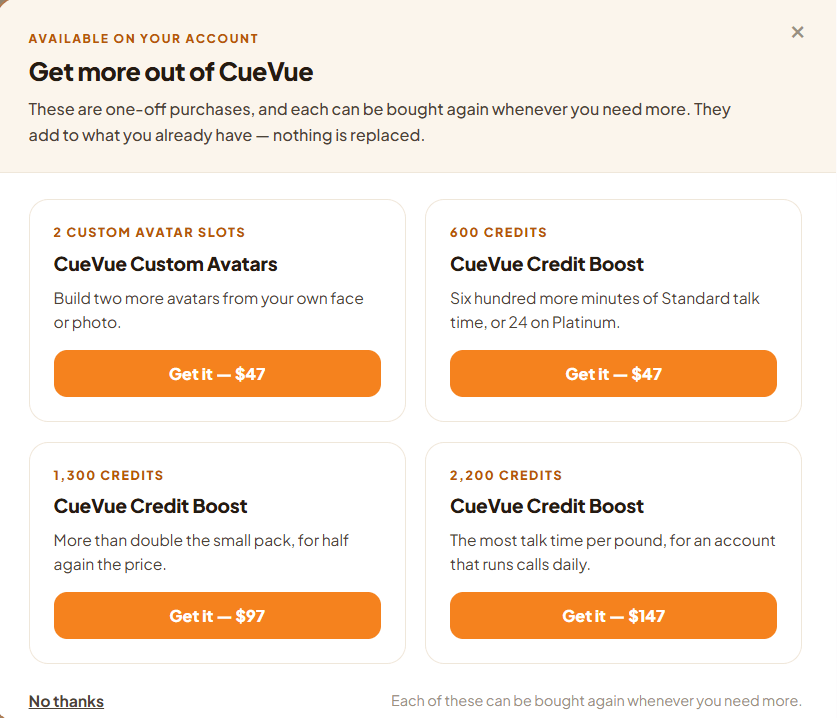
CueVue’s in-account credit and custom avatar options shown in my dashboard.
At the time I took this screenshot, my account showed these one-time purchase options:
600 Credits — $47
The dashboard describes this as 600 additional minutes of Standard talk time, or 24 on Platinum.
1,300 Credits — $97
A larger credit package for accounts that need more usage.
2,200 Credits — $147
The largest of the three credit packages shown in my account.
2 Custom Avatar Slots — $47
This lets you build two additional avatars using your own face or photo.
These are shown as one-off purchases, and the dashboard states that they can be purchased again when more are needed.
That’s worth considering when creating your own client pricing because your monthly fee needs to account for not only your time and service but also the actual LiveRep usage.
Could You Charge $297 Per Month for a CueVue LiveRep Service?
Potentially—but $297 isn’t an official CueVue client price.
It’s an example of how an agency might package its own managed service.
For example, I could create something like:
AI LiveRep Management — $297/Month
A hypothetical package might include:
- LiveRep setup
- Business knowledge-base configuration
- Website deployment
- LiveRep mission configuration
- Ongoing knowledge updates
- Conversation and lead monitoring
- Client reporting
- Support
- A defined monthly credit allowance
For example, you might include 100 credits per month and charge separately if the client’s usage exceeds the package allowance.
The actual pricing is entirely up to the agency.
You need to consider your CueVue costs, credit usage, setup time, ongoing management and the value you’re providing to the client.
So I wouldn’t tell someone:
“Buy CueVue and you’ll make $297 per month.”
I’d explain it this way:
CueVue gives you technology that you can potentially package into your own managed service and price according to your market.
Whether you find clients, what they’re willing to pay and whether you make a profit depends on your own marketing, pricing, expenses and ability to deliver the service.
Finding Potential CueVue Clients With Local Business Chat Finder
This leads perfectly into one of the bonuses.
Bonus #4 — Local Business Chat Finder
Instead of manually searching local business websites one by one, Local Business Chat Finder is designed to help identify potential prospects based on location and business category.
You can look for businesses that already have chat installed as well as those that don’t.
And businesses that already use website chat shouldn’t necessarily be ignored.
They may actually understand the value of engaging visitors already.
Your conversation doesn’t have to begin with:
“Have you ever thought about putting chat on your website?”
Instead, you can show them what a LiveRep could add beyond their current setup.
Combine prospecting with a good demonstration, and the conversation becomes much easier to understand.
My 5 CueVue Bonuses
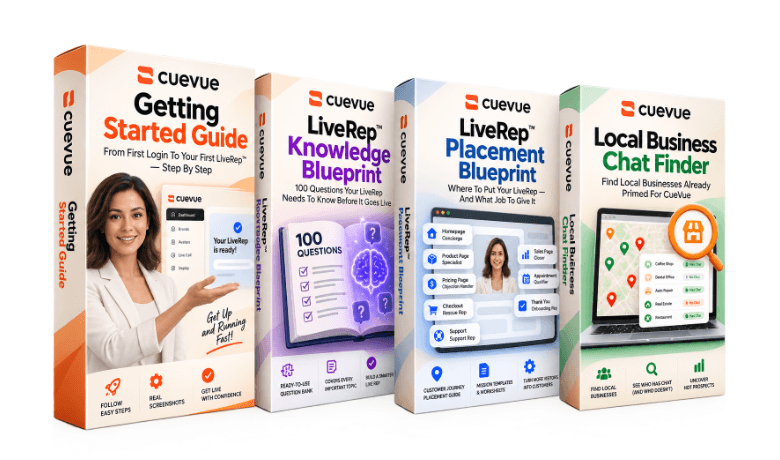
When you purchase CueVue through my link, you’ll get exclusive bonuses designed to help you get started faster and confidently offer the service to others.
Bonus #1 — LiveRep™ Knowledge Blueprint
100 Questions Your LiveRep Needs to Know Before It Goes Live
A LiveRep is only as useful as the information behind it.
This blueprint gives you 100 important questions covering products, pricing, policies, objections, appointments, fulfillment, qualification, support and more.
It also includes the 5-Minute Knowledge Audit, Stump Test and First 10 Test Questions to help identify gaps before sending real visitors to your LiveRep.
Bonus #2 — LiveRep™ Placement Blueprint
Where to Put Your LiveRep — And What Job to Give It
This goes beyond simply putting an avatar in the corner of every page.
The blueprint helps you think about the visitor’s mindset, what the LiveRep should know and what outcome it should pursue at different points in the customer journey.
It covers areas such as the homepage, product pages, pricing, checkout, appointments, onboarding and support.
Bonus #3 — CueVue Getting Started Guide
From First Login to Your First LiveRep™ — Step by Step
This is particularly useful if you don’t want to figure everything out by trial and error.
The guide walks through:
Business → Knowledge → LiveRep → Mission → Appearance → Deployment
It includes actual CueVue screenshots so you can follow the setup visually.
Bonus #4 — Local Business Chat Finder
Find Businesses That Could Be Potential LiveRep Clients
As discussed above, this tool helps with the prospecting side of the agency opportunity.
Search businesses by location and business type and identify potential prospects without manually checking websites one by one.
Bonus #5 — Client Site Overlay
Show a LiveRep on a Prospect’s Website Before Installing Anything
I really like the idea behind this one.
After creating a LiveRep for a prospect, you can generate a shareable link that displays the LiveRep over the client’s website.
Nothing has to be installed or changed on their actual website for the demonstration.
Instead of asking the prospect to imagine what you’re selling, you can let them experience it.
For an agency or freelancer, that’s a much stronger demonstration.
What I Like About CueVue
After actually using the platform, there are several things I like.
First, the LiveRep has a purpose beyond looking impressive.
You give it business knowledge and a mission.
Second, I like having conversations, leads and activity accessible through the dashboard instead of treating the avatar as a standalone visual gimmick.
Third, CueVue can work across different types of businesses. I’m already experimenting with it in AI video services and health and wellness.
And finally, I like the service opportunity.
My experience sharing CueVue with Ely helped me see that there may be a business model here beyond simply earning affiliate commissions.
What I Don’t Like About CueVue
CueVue isn’t something I’d install and then completely forget about.
A LiveRep needs accurate information.
You should review its knowledge, test the kinds of questions visitors might ask and update the information as your business changes.
Usage credits are another consideration.
If you’re running multiple busy client websites, conversations consume resources, so you need to understand the credit system and factor those costs into your service pricing.
And AI shouldn’t be expected to handle every possible customer situation.
There should still be a path to a human when a conversation requires one.
Is CueVue Worth It?
For me, the more interesting question isn’t simply whether CueVue can put an AI avatar on a website.
There are plenty of AI avatar tools now.
What interests me is whether that avatar can become a useful part of the business.
Can it answer real questions?
Can it capture useful information?
Can it help move someone toward the right next step?
Can I manage the conversations and leads afterward?
And could I package that capability into a service for other businesses?
Those are the reasons I’m continuing to use and test CueVue.
I’ve already put LiveReps on my own websites, shared the technology with people I know, and gained my first client from introducing someone to what it can do.
That’s my experience—not an income guarantee or a prediction of what someone else will achieve.
But it has been enough for me to keep exploring where this technology can go.
👉 See CueVue and check the current offer:
https://tinyurl.com/talkingsite
If you’re interested in using an AI LiveRep on your own website—or potentially building a managed LiveRep service for clients—you can check out the current CueVue offer and decide whether it fits what you’re trying to build.


